

AI Voice Receptionist for Real Estate Brokerages: Lead Routing, Agent Transfers, Showing Requests & After-Hours Calls
Peak Demand builds brokerage Voice AI around the operating rules behind the phone line — lead intake, office and territory routing, assigned-agent logic, live transfers, showing requests, after-hours coverage, CRM actions, notifications, and human escalation when the workflow needs a brokerage professional.
Distribute calls by office, territory, lead type, listing ownership, assigned agent, or brokerage-defined rules.
Attempt approved agent transfers and coordinate showing requests without losing the caller when a destination is unavailable.
Capture and organize opportunities outside office hours with defined alerts, callbacks, queues, and escalation paths.
A brokerage phone line is a routing problem before it is an answering problem.
One number can receive new buyer leads, seller opportunities, listing questions, showing requests, active-client calls, agent-to-agent calls, referrals, vendor calls, office inquiries, recruiting calls, and after-hours requests. The useful outcome is not simply answering — it is understanding where the call belongs and what should happen next.
A custom Voice AI receptionist can apply the brokerage's own business rules at the front of that flow. It can identify the call type, collect the minimum context required, route or transfer where appropriate, support an approved booking or request, and create a structured fallback when the intended destination cannot take the call.
- Separate new lead intake from active-client, administrative, recruiting, vendor, and internal brokerage calls.
- Apply office, territory, listing ownership, assigned-agent, team, language, and availability rules before routing.
- Attempt live transfers without abandoning the caller when the agent or destination is unavailable.
- Keep showing and consultation requests connected to the correct property, agent, calendar, and follow-up path.
- Use different daytime, evening, weekend, and urgent escalation rules when the brokerage requires them.
A caller can reach the right agent, office, appointment path, queue, callback, or human-review workflow without forcing every inquiry through one generic receptionist script.
The first routing decision should come from why the caller is calling.
A brokerage can define separate front-door paths for revenue-generating leads, existing relationships, listing-specific requests, office operations, and calls that require immediate human ownership.
Buyer leads
Capture location, property interest, timing, showing intent, contact details, and the routing fields the brokerage needs before assigning ownership.
Seller leads
Capture property details, selling timeline, listing or valuation intent, and the office or agent path responsible for the opportunity.
Listing & showing calls
Identify the property, answer approved listing questions, capture showing intent, and connect the caller to the listing or scheduling workflow.
Current clients
Recognize active-client or past-client requests and route them away from new-lead intake to the correct assigned-agent or office service path.
Office & operations
Handle vendors, recruiting, partner, media, staff, administrative, and general-office calls through separate approved destinations.
Exceptions
Escalate uncertain ownership, urgent active-transaction issues, restricted topics, system failures, or any call type the brokerage wants reviewed by a human.
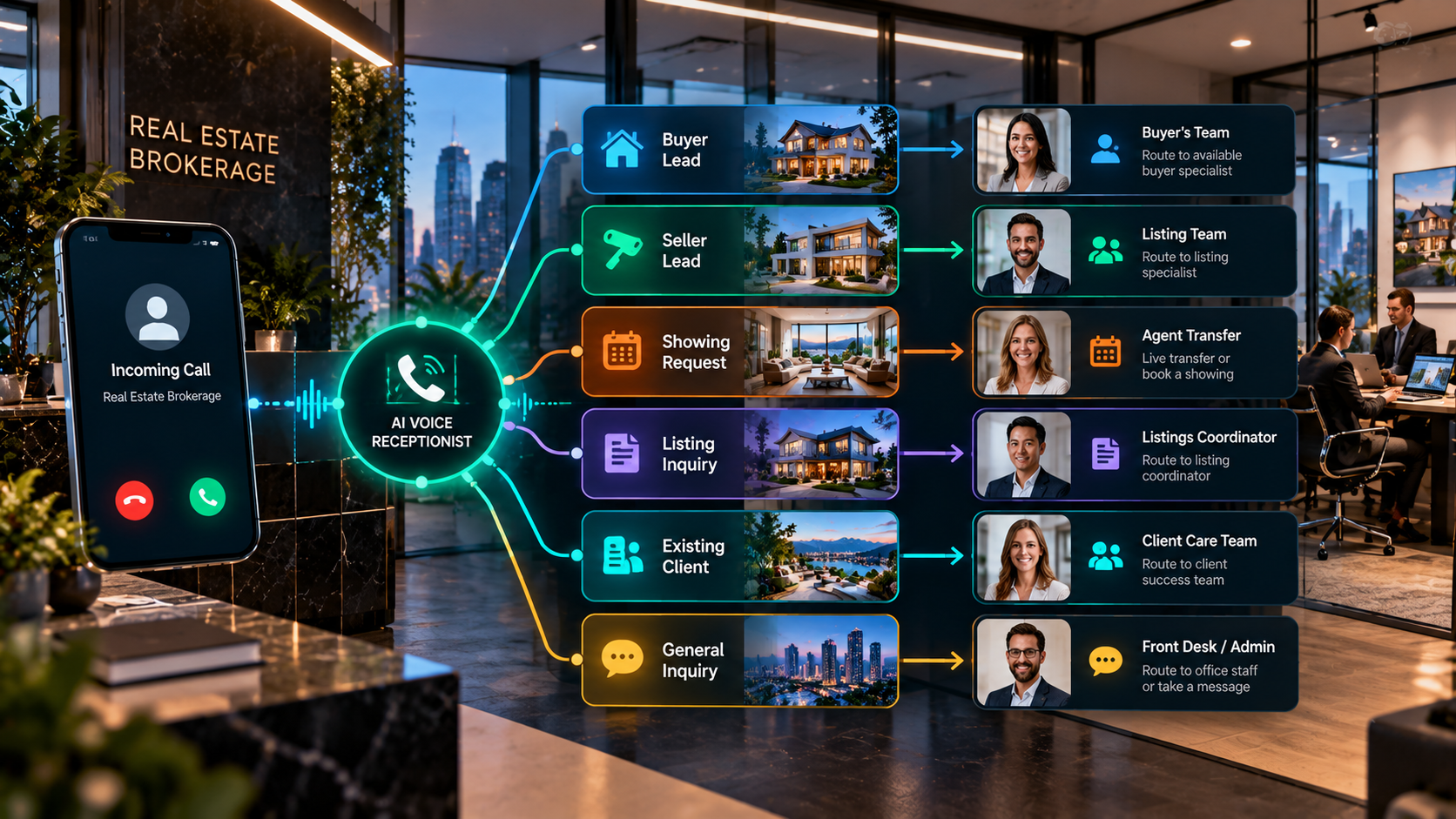
Routing can reflect the brokerage's real ownership rules — not a single catch-all queue.
A brokerage may distribute calls differently depending on whether the opportunity belongs to a listing agent, a geographic farm, a branch office, a specialty team, an assigned agent, or a shared lead pool.
Office + territory
Route by branch, neighbourhood, city, postal code, service area, or another reliable geographic field.
Listing ownership
Send property-specific calls toward the listing agent, listing team, showing desk, or brokerage-defined fallback.
Lead ownership
Use assigned-agent records, source rules, CRM ownership, team assignment, round-robin, or another approved distribution model.
Intent
Differentiate buyer, seller, renter, investor, showing, listing, active-client, vendor, recruiting, and office-service calls.
Availability
Attempt a live destination when appropriate, then use a callback, team queue, alternate office, or other fallback if the destination is unavailable.
Time + exception rules
Change routing behavior by business hours, evenings, weekends, office closures, urgent triggers, language, or other brokerage-defined conditions.
The brokerage should be able to see why a call went to an agent, team, office, queue, callback, or human-review path instead of relying on an opaque decision.
A failed transfer should not become a failed lead.
The live-transfer path needs its own fallback architecture. If the intended agent does not answer, the Voice AI can return to the caller with a clear next step rather than ending the interaction or sending the caller blindly to voicemail.
Transfer logic can preserve the context already collected, so the fallback callback, team notification, or CRM task includes the property, caller intent, requested action, and reason the transfer could not be completed.
Caller intent → identify owner → confirm transfer is appropriate → attempt agent/team destination → connect if answered → otherwise return to fallback → create callback or team task → notify the correct owner.
A brokerage showing request needs property, ownership, availability, and fallback logic working together.
An open time on a calendar is not enough. The workflow needs to know which listing is involved, which agent or team controls it, what notice or access rules apply, and whether the brokerage permits the AI to confirm the appointment or only create a request.
Property
Identify the listing, address, unit, development, or other property reference involved.
Owner
Determine the listing agent, showing team, office, or scheduling desk responsible for the request.
Rules
Apply notice, availability, access, confirmation, buffer, and brokerage-specific booking requirements.
Fallback
If the showing cannot be confirmed cleanly, create a request, callback, alternative-time path, or human handoff.
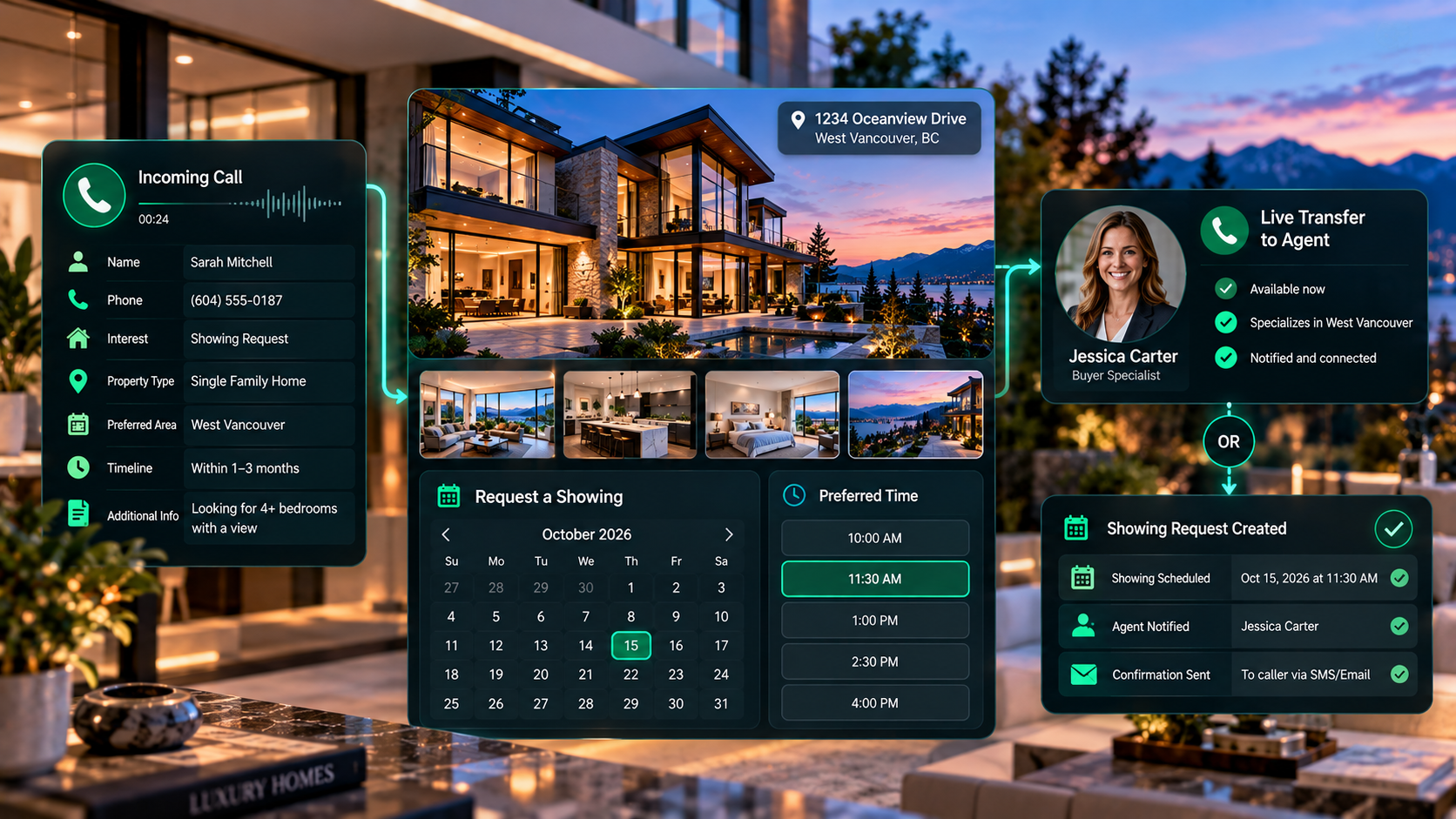
Peak Demand can build around the brokerage's listing ownership, calendars, office rules, notice periods, transfer logic, and confirmation requirements.
After hours should change the routing rules — not erase the workflow.
Evenings and weekends can still produce buyer leads, seller inquiries, showing requests, listing questions, and active-client calls. The brokerage can define what the AI may complete immediately, what waits for the next staffed period, and what should trigger an urgent human alert.
Capture now
Collect the approved lead or service context while the caller is engaged instead of asking them to leave an unstructured voicemail.
Queue the next action
Create the CRM record, callback, showing request, consultation task, office queue, or other next-step workflow supported by the brokerage's systems.
Escalate exceptions
Alert an on-call agent, office contact, team, or manager only when the brokerage's defined after-hours trigger is met.
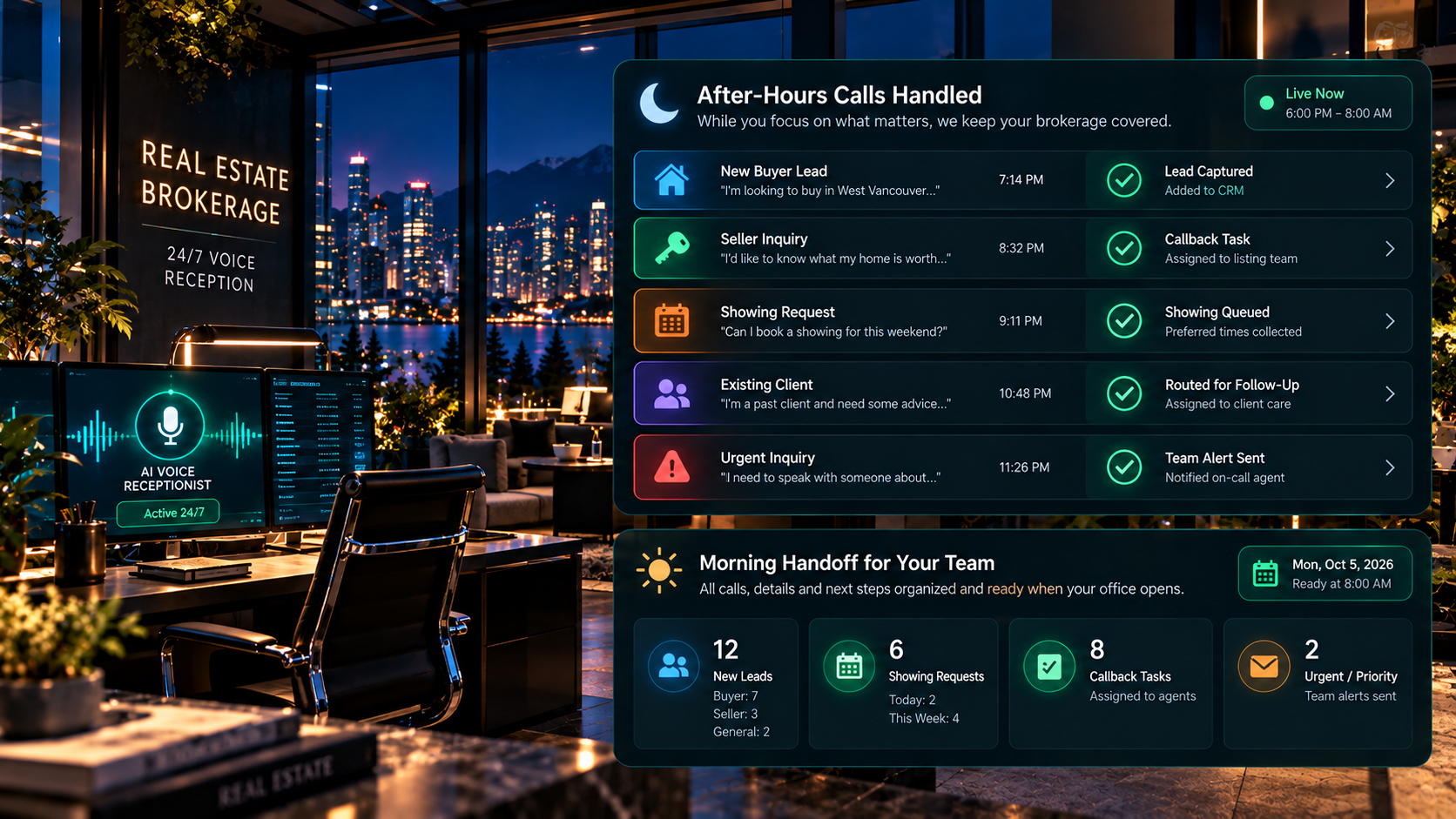
Use Voice AI for structured coverage, then hand judgment, sensitive decisions, and true exceptions to the appropriate brokerage professional.
The conversation layer is only one part of brokerage operations.
Where supported and authorized, a custom brokerage receptionist can connect approved call outcomes to CRM or lead platforms, calendars, listing data, telephony, notifications, forms, databases, office queues, and internal routing.
Peak Demand's middleware can sit between the Voice AI and downstream systems to enforce validation, permissions, business rules, logging, retries, and fallback logic rather than allowing a conversational layer to write directly into every system without controls.
- Structured lead and call-outcome fields instead of transcript-only handoff.
- Controlled actions that match the brokerage's permissions and connected-system capabilities.
- Fallback paths when a CRM, calendar, routing destination, or transfer cannot be completed.
Caller → Voice AI receptionist → Peak Demand middleware → validation + brokerage business rules → approved CRM / calendar / telephony / notification action → completion confirmation or human fallback.
Brokerage Voice AI should be built around the brokerage's operating model — not the other way around.
A single-office boutique brokerage, a regional multi-office group, and a national network can all receive similar call types while using very different lead ownership, transfer, calendar, territory, listing, CRM, after-hours, and escalation rules.
Map the phone architecture
Document phone numbers, office destinations, teams, agent pools, transfer targets, business hours, after-hours contacts, and existing call-routing behavior.
Map the business rules
Define how buyer, seller, listing, showing, current-client, vendor, recruiting, and exception calls change the questions, ownership, and next action.
Map the system actions
Define which CRM, calendar, listing-data, telephony, notification, and internal workflow actions may occur — and what happens when they fail.
Peak Demand can build and manage the Voice AI, middleware, integration, routing, QA, monitoring, and ongoing workflow changes while the brokerage retains control over lead ownership, transfer policy, professional judgment, pricing strategy, negotiation, legal or lending questions, and exceptions.
Reception and routing can be automated without automating brokerage judgment.
The workflow can organize the front end of the call and complete approved administrative actions. Pricing strategy, negotiation, legal interpretation, lending advice, representation decisions, transaction strategy, and other professional judgment remain with the appropriate human.
Connect brokerage reception to qualification, routing, scheduling, and custom architecture.
This brokerage hub sits above more focused capability and workflow pages so each operational function can be mapped in more detail.
AI Receptionist for Real Estate
Broader Voice AI receptionist capability for real estate calls, intake, booking, routing, and human handoff.
Explore AI receptionReal Estate AI Lead Qualification
Capture intent, timing, property context, and next-step readiness before routing or follow-up.
Explore lead qualificationBrokerage AI Lead Routing
Distribute calls by office, agent, territory, listing ownership, lead type, or brokerage-defined logic.
Explore brokerage lead routingCustom Voice AI for Real Estate
Build the AI receptionist and middleware around the brokerage's exact systems, rules, call types, permissions, and exceptions.
Explore custom buildsQuestions brokerages ask about AI reception, routing, transfers, showing requests, and after-hours calls.
These answers focus on brokerage-level call operations: caller intent, lead ownership, office and territory routing, agent transfers, scheduling, connected systems, after-hours rules, and human-control boundaries.
What is an AI Voice Receptionist for a real estate brokerage?
How is brokerage Voice AI different from a basic answering service?
Can it route leads to the right real estate agent?
Can it transfer callers directly to an agent?
Can the workflow support round-robin lead distribution?
Can it handle buyer and seller calls differently?
Can it answer questions about a specific listing?
Can it book property showings?
Can it handle showing requests for multiple agents?
Can it answer calls after hours?
Can after-hours callers still reach a human?
Can the AI collect lead qualification information?
Can Voice AI update our real estate CRM?
Can it notify the assigned agent after a call?
Can it route by brokerage office or branch?
Can it support calls for current clients as well as new leads?
What happens when an agent does not answer a transfer?
Can the AI handle agent recruiting or vendor calls?
Can it provide pricing, negotiation, legal, or lending advice?
Can the brokerage define different business-hour and after-hour rules?
What happens if the CRM, calendar, or routing system is unavailable?
Can calls be recorded or logged for brokerage reporting?
Can different offices use different scripts or rules?
How much of the brokerage call flow can be customized?
What should a brokerage bring to a Voice AI discovery call?
Your brokerage call flow should look like your brokerage — not everyone else's.
Peak Demand can map, build, connect, test, monitor, and improve a custom Voice AI workflow for lead intake, office and agent routing, transfers, showing requests, after-hours coverage, CRM actions, notifications, fallback logic, and human escalation.
Call types → offices → territories → lead ownership → listing ownership → agent pools → transfer rules → showing process → calendars → CRM actions → after-hours logic → alerts → fallbacks → human escalation.
The Voice AI should reflect the brokerage's operating model instead of forcing the brokerage to adopt a generic receptionist flow.