

AI Showing Scheduler for Real Estate: Book Property Tours From Inbound Calls 24/7
Peak Demand builds custom Voice AI workflows that can handle inbound property-tour requests 24/7, identify the listing the caller wants to see, capture scheduling preferences, follow your brokerage's showing rules, and move the request toward a confirmed tour or the appropriate agent follow-up.
Identify the listing, location, property type, and tour request before scheduling.
Follow approved showing windows, agent availability, scheduling rules, and booking constraints.
Confirm the tour, notify the assigned agent, update connected systems, or route exceptions for review.
A showing request should not become voicemail.
When a buyer calls because they want to see a property, the useful outcome is not simply capturing a name and phone number. The workflow should understand which property they mean, what timing they want, which rules apply, and what should happen next.
Peak Demand designs Real Estate Voice AI around the brokerage's actual showing process. The AI can ask the required questions naturally, gather scheduling context, check supported availability, apply approved property or agent rules, and move the caller toward a confirmed tour, scheduling request, callback, or human review.
The goal is not simply to put an appointment on a calendar. The goal is to move an inbound property inquiry through the brokerage's real showing workflow.

Property rules, agent ownership, notice requirements, calendars, confirmation steps, and exceptions can all affect whether a tour should be booked immediately or routed for review.
The AI needs the right property and the right scheduling context before it books anything.
Showing automation works best when property identification, caller timing, availability, brokerage rules, confirmation, and agent ownership are treated as one connected workflow.
Identify the property
Confirm the address, listing, community, campaign source, or other approved identifier so the showing request is attached to the correct property.
Capture showing preferences
Ask for the preferred day, time, alternate window, number of properties, and other approved scheduling details without forcing a rigid questionnaire.
Check supported availability
Use connected calendars or scheduling systems where available, or create a structured scheduling request when live booking access is not appropriate.
Apply showing rules
Respect notice periods, showing windows, property restrictions, assigned-agent rules, access requirements, and approval steps configured by the brokerage.
Confirm the next step
Provide the approved date and time, create a pending request, route the caller to an agent, or explain that the brokerage team will confirm the showing.
Connect the outcome
Update the calendar, CRM, property record, agent notification, follow-up task, or human-review queue when the connected workflow supports it.
Not every showing request should follow the same booking path.
Some properties may allow an approved time to be booked immediately. Others may require agent confirmation, property-specific instructions, tenant coordination, or human review before the tour is finalized.
Direct booking
Use when the property, calendar access, showing rules, and assigned-agent workflow support an immediate confirmed tour.
Request confirmation
Capture preferred times and create a structured request when an agent or brokerage team member needs to approve the showing.
Offer alternate times
When the requested time is unavailable, present another approved window or capture alternate preferences for follow-up.
Human review
Route exceptions such as unclear property requests, special access needs, conflicting instructions, or unsupported scheduling conditions.
Identify the property before scheduling anything.
A caller may say “the house on Lakeshore,” refer to an address, mention a listing they just saw online, or ask to tour several properties. The workflow should resolve the property context before it touches a calendar.
Showing availability is more than an empty calendar slot.
The AI should not blindly put every caller onto a calendar. Peak Demand can build showing logic around the availability, notice periods, access instructions, assigned agents, property restrictions, and exception paths your brokerage actually uses.
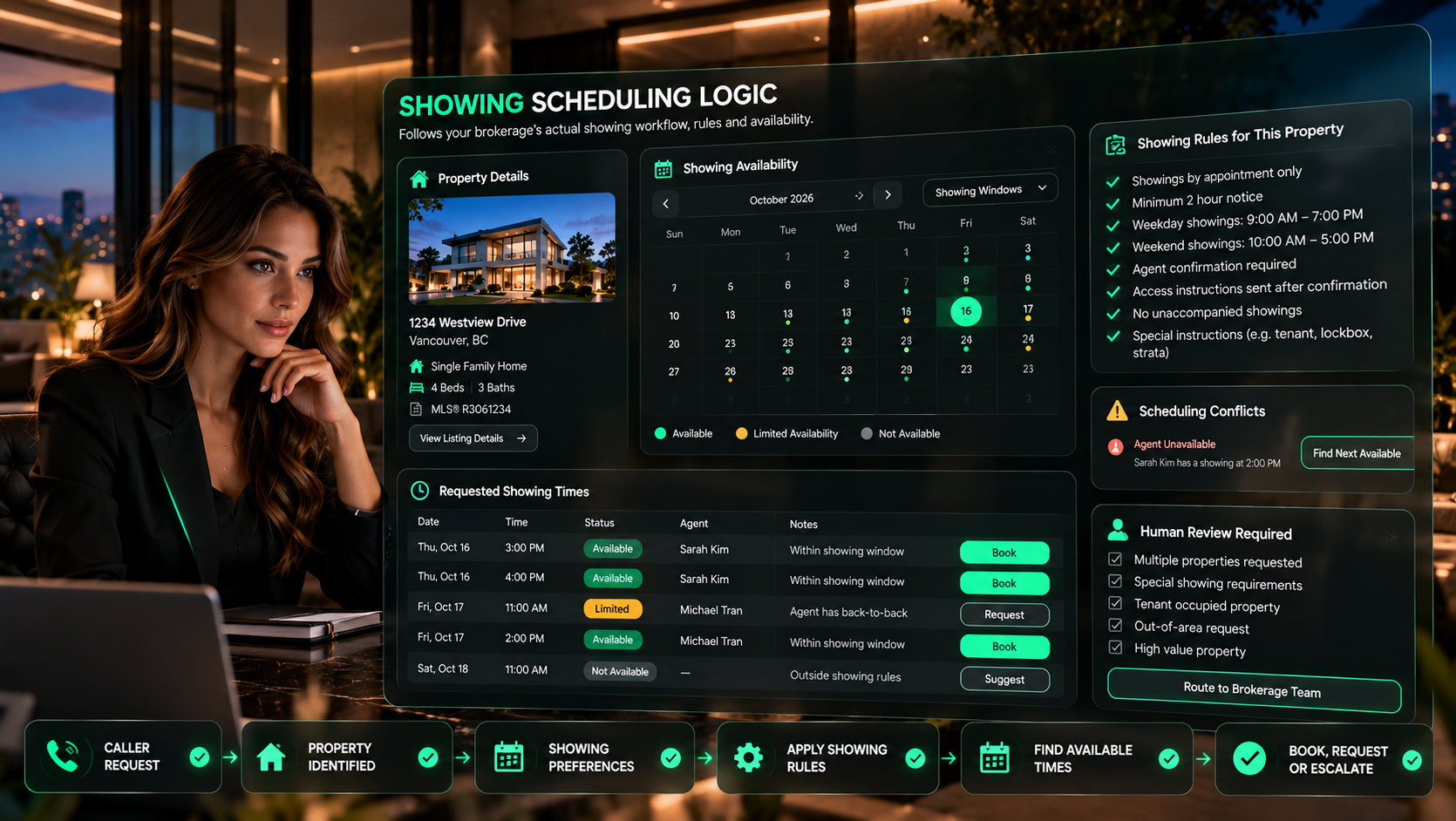
Notice periods
Require the configured amount of notice before a showing can be scheduled or route short-notice requests for review.
Showing windows
Offer only approved times based on property, weekday, weekend, office, agent, or other configured availability rules.
Agent assignment
Respect listing-agent, buyer-agent, team, office, geography, or ownership rules when the workflow determines who should receive the request.
Property instructions
Account for approved access requirements, tenant coordination, lockbox restrictions, open-house windows, or property-specific notes.
Conflict handling
Offer another approved time, collect alternate preferences, or create a human-review task instead of forcing a booking.
Approval steps
Support direct booking where allowed and request-based workflows when the assigned agent or brokerage team must confirm first.
Peak Demand can model the actual rules that sit between an inbound call and a legitimate property-tour confirmation.
A buyer should feel like they are arranging a tour, not completing a form by phone.
The conversation can collect the required details in context, avoid irrelevant questions, clarify ambiguous requests, and summarize the showing before the call ends.
- Ask for the property and scheduling preference naturally instead of reading a fixed questionnaire.
- Use the caller's answers to determine which follow-up question is actually needed next.
- Confirm the property, date, time, and next step before ending the scheduling conversation.
- Explain when a showing is confirmed, pending agent approval, unavailable, or being routed for review.
- Keep professional real estate advice, negotiation, and licensed judgment with the brokerage team.
A confirmed tour should become a connected workflow.
Once a showing is confirmed, the useful work continues. The right buyer details, property context, calendars, agent notifications, CRM records, and follow-up actions should stay aligned.

Buyer confirmation
Confirm the property, approved tour time, and any permitted preparation or access details.
Calendar update
Create or update the supported calendar event and keep the confirmed time associated with the correct property and lead.
Agent notification
Alert the assigned agent or team with the showing details and relevant caller context.
CRM lead update
Record the property interest, showing activity, ownership, call summary, and next follow-up when the CRM connection supports it.
Property record
Attach the showing activity to the appropriate property or listing workflow when the connected system supports that structure.
Follow-up task
Trigger the brokerage's approved post-showing workflow, callback task, reminder, or human review step.
Showing changes need their own workflow, not an improvised message.
A reschedule or cancellation can affect calendars, agents, property access, CRM activity, buyer expectations, and follow-up. Peak Demand can design those paths as deliberately as the original booking.
Your showing workflow should fit your brokerage, not the other way around.
Peak Demand builds custom Voice AI and middleware around the calendars, CRM fields, showing platforms, routing rules, property data, agent ownership, notifications, and approval steps your operation actually uses.
The correct integration path depends on system access, APIs, permissions, data fields, booking rules, vendor constraints, and governance. Some actions can be completed directly. Others should create structured requests, notifications, or approval-based handoffs.
Calendars and showing systems
Check supported availability, create or request tours, apply scheduling rules, and keep updates synchronized where system access permits.
CRM and lead records
Connect the property inquiry and showing activity to the correct lead, owner, pipeline stage, task, or follow-up sequence.
Property and listing context
Use approved listing identifiers, property records, campaign context, or connected data to resolve which property the caller wants to tour.
Custom middleware logic
Orchestrate rules across the Voice AI, scheduling layer, CRM, notifications, and human-review paths when one out-of-the-box tool is not enough.
Showing calls can become operational visibility, not just calendar events.
A managed showing workflow can help the brokerage understand which properties generate demand, when buyers want to tour, where requests fail, and which calls need more agent attention.
Showing request volume
Track inbound property-tour demand by time, office, campaign, property, or other configured dimensions.
Scheduling outcomes
See confirmed tours, pending requests, alternate times, agent callbacks, cancellations, and human-review events.
Rule exceptions
Identify recurring conflicts such as unavailable times, notice restrictions, property instructions, or unsupported scheduling conditions.
Conversation quality
Review calls where the property was unclear, timing was misunderstood, handoff quality was weak, or the workflow needs tuning.
Peak Demand can review real calls, scheduling outcomes, failure patterns, staff feedback, and integration behaviour to refine the workflow over time.
Schedule the property tour. Do not make subjective judgments about the caller.
A showing scheduler should use transaction-relevant property and scheduling information, approved business rules, supported availability, and defined escalation paths. It should not infer, rank, or treat callers or leads differently based on protected characteristics.
Brokerages should define lawful scheduling, routing, access, privacy, and recordkeeping practices for the jurisdictions where they operate. Peak Demand can build clear human-review paths for sensitive, ambiguous, restricted, or unsupported requests.
Approved scheduling rules
Define what the AI can book, request, reschedule, cancel, communicate, and update before production launch.
Human exception paths
Route unclear listings, special access requests, unsupported calendar conditions, and other exceptions to brokerage staff.
Brokerage control
Keep professional advice, property access decisions, negotiation, exceptions, and licensed judgment with the appropriate real estate team.
Questions real estate teams ask before automating property-tour scheduling.
These answers cover inbound showing calls, property identification, scheduling rules, calendars, confirmations, CRM updates, rescheduling, cancellations, agent notifications, and human control.
What is an AI showing scheduler for real estate?
Can Voice AI book property showings 24/7?
How does the AI know which property the caller wants to see?
Can the AI schedule multiple properties during one call?
Can the AI check agent availability?
Can each property have different showing rules?
What happens if the requested time is unavailable?
Can the AI confirm a showing with the buyer?
Can the AI notify the listing or buyer agent?
Can showing requests be written into our CRM?
Can the AI reschedule property tours?
Can the AI cancel a showing?
Does the AI replace the real estate agent?
Does the AI decide which buyers should be allowed to see a property?
Can the AI handle after-hours showing calls?
Can the AI work with our existing calendars and real estate systems?
How is this different from a generic appointment scheduler?
What should we bring to a discovery call for an AI showing scheduler?
Need inbound property calls to become organized showing requests and confirmed tours?
Peak Demand can design, integrate, launch, monitor, and improve a custom Real Estate Voice AI showing workflow around your properties, calendars, agent rules, CRM, notifications, rescheduling, cancellations, and human-review paths.
This is strongest when property tours depend on listing identification, availability, agent ownership, notice periods, access instructions, CRM updates, notifications, rescheduling, cancellations, or exception handling.
Peak Demand manages the workflow as an operating layer, not a generic calendar bot.