

AI Receptionist for Real Estate: 24/7 Lead Capture, Property Calls, Booking & Routing
Peak Demand builds custom Voice AI receptionists for real estate teams that need property calls answered around the clock, leads captured, showing and consultation requests organized, callers routed correctly, and every conversation moved toward a useful next step.
Buyer, seller, renter, investor, listing, showing, valuation, office, and general property inquiries.
Collect contact details, call intent, property context, timing, requested action, and approved workflow information.
Move callers into showing requests, consultations, CRM updates, agent routing, callbacks, or human handoff.
A real estate AI receptionist should do more than answer the phone.
The useful version understands why the caller reached out, captures the information your team needs, handles approved requests, and connects the conversation to the correct booking, routing, CRM, follow-up, or human handoff workflow.
Peak Demand designs the receptionist around your real estate business rather than forcing every brokerage, team, leasing operation, or property organization into the same generic script. The call flow can adapt to buyer, seller, renter, investor, listing, showing, valuation, office, and service-related inquiries.
The result is a managed front-door call layer that helps make every inbound call useful, even when your agents are showing properties, meeting clients, driving, working another lead, or unavailable after hours.
- Answer calls and identify what the caller actually needs before deciding the next workflow.
- Capture structured contact and property context without making the conversation feel like a rigid form.
- Move supported requests into booking, agent routing, CRM updates, notifications, callbacks, or human review.
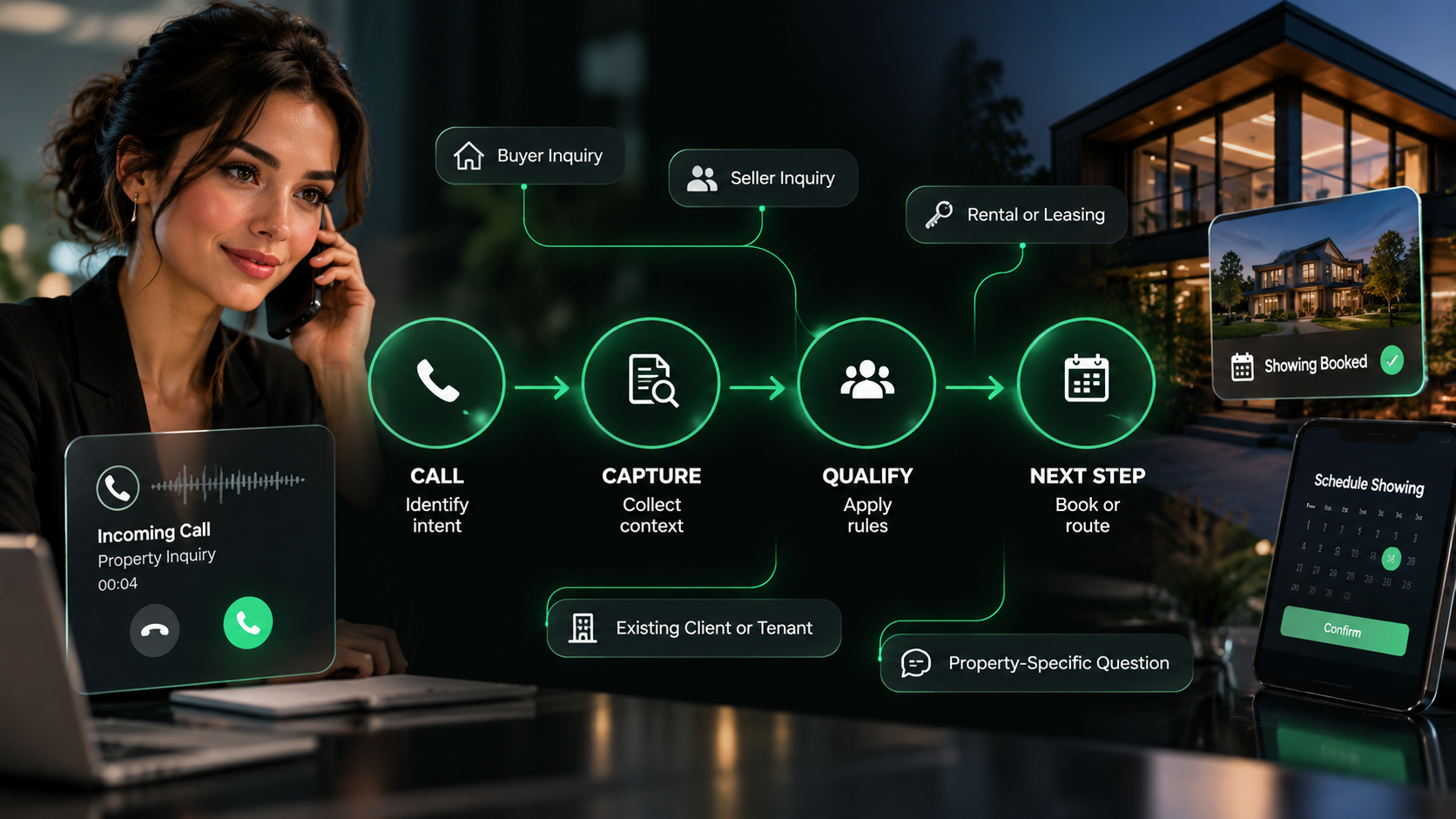
It can support the full front-door path from the first ring through lead capture, property inquiry handling, booking requests, agent routing, summaries, follow-up, and escalation.
Different real estate calls need different paths.
A buyer asking for a showing, a homeowner asking about selling, a renter asking about availability, and an investor asking about a property should not be pushed through the same conversation.
Buyer calls
Property availability, listing questions, location, needs, showing requests, preferred timing, and agent follow-up.
Seller calls
Property details, valuation or listing interest, consultation requests, timing, and routing to the appropriate listing workflow.
Rental & leasing calls
Availability, property questions, viewing requests, application-process questions, leasing follow-up, and team routing.
Investor & commercial calls
Property or asset interest, geography, timing, requested information, specialist routing, consultation, or callback requests.
Listing inquiries
Identify the listing, capture the caller's question, provide approved factual information, and route deeper questions to the right agent.
Showing requests
Capture the property, preferred date or time, caller details, and any approved scheduling context before moving into the showing workflow.
General brokerage calls
Office information, agent requests, callback requests, department routing, after-hours messages, and other supported front-desk inquiries.
The first goal is simple: do not let a useful property call disappear.
When a caller reaches your team, the AI receptionist can capture the contact, understand the reason for the call, collect the approved context your team needs, and create a next step even when no agent is immediately available.
- Collect caller name, contact information, property or listing reference, and the reason for the call.
- Capture approved buyer, seller, renter, investor, showing, consultation, or callback context.
- Use natural conversation and branching questions instead of forcing every caller through the same script.
- Create a structured summary, lead record, task, alert, or callback request based on the configured workflow.
- Move to a live agent or human-approved fallback when the caller asks for a person or the request reaches a boundary.
When a caller is ready for the next step, the receptionist should help move them there.
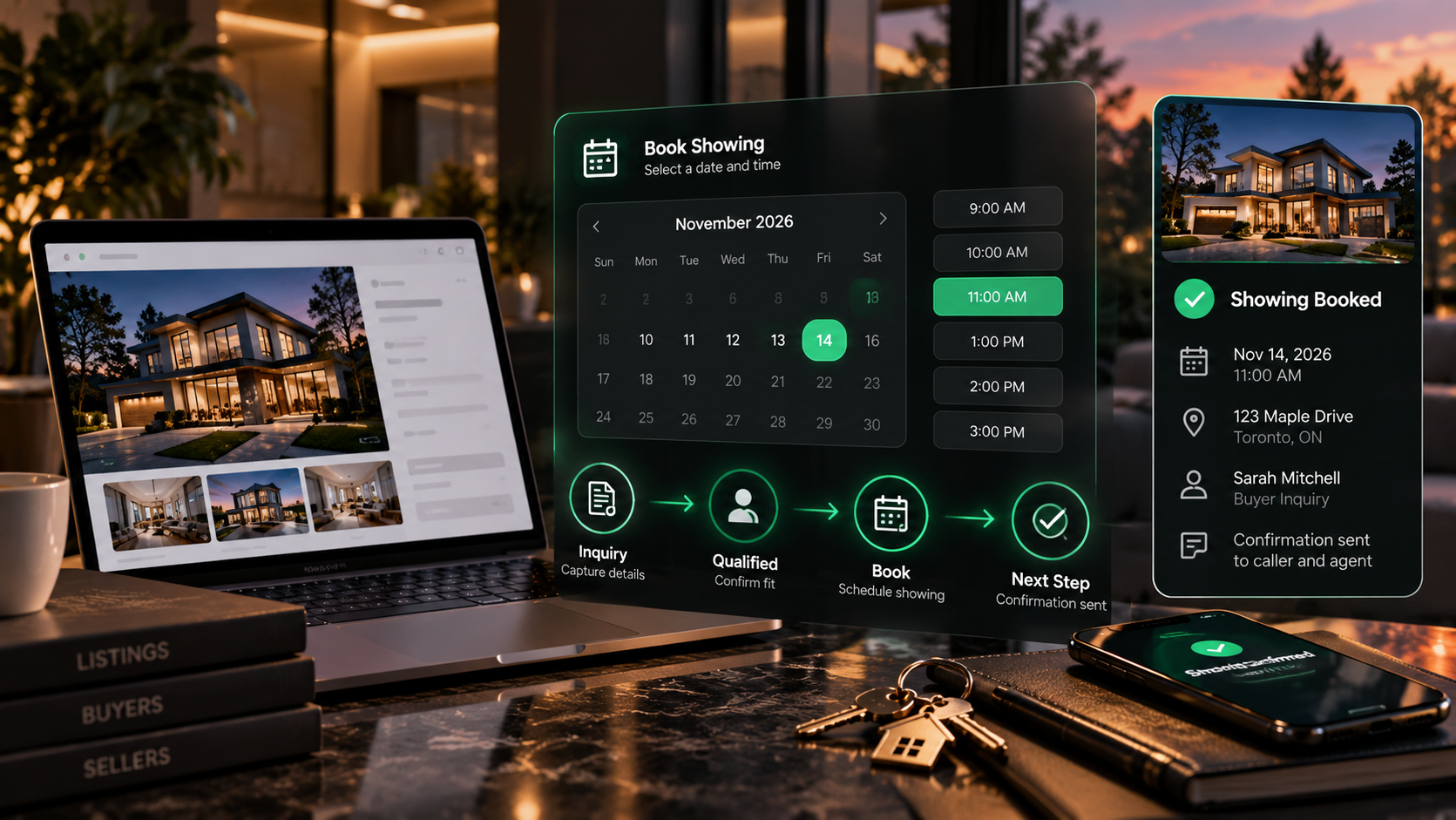
Voice AI can support showing requests, buyer consultations, seller consultations, valuation conversations, leasing appointments, callbacks, and other scheduling workflows when the connected systems and business rules support them.
The booking path can collect the property or service involved, preferred date or time, contact details, assigned agent or office context, and any required approval or handoff information. Depending on system access, the workflow can complete a booking, request a booking, hold a time, or create a staff task for confirmation.

The receptionist should know who owns the next step.
Routing can be designed around the way your real estate organization actually works: office, geography, agent ownership, property type, language, call intent, business hours, specialty, or another approved operating rule.
Agent and team routing
Send calls, leads, summaries, or tasks to the appropriate agent, team, branch, specialty, or ownership queue.
Live transfer when appropriate
Transfer callers to a live agent or team member when requested, when staff are available, or when the configured workflow calls for it.
Escalate exceptions
Move sensitive, unclear, urgent, judgment-based, or out-of-scope conversations into a human-approved fallback instead of forcing automation.
Respect lead ownership
Use existing CRM ownership, team assignment, source rules, property ownership, or office logic where those signals are available.
Language-aware routing
Supported multilingual workflows can route callers to the right language path or human team when the organization requires it.
After-hours fallback
When live transfer is unavailable, create a structured callback, urgent alert, message, or next-business-day task instead of losing the call.
A useful receptionist connects the call to the systems behind your team.
Peak Demand can design receptionist workflows that connect approved call outcomes to CRM records, calendars, showing workflows, notifications, lead-routing rules, reporting layers, middleware, and other real estate operating systems.
The exact integration path depends on system access, APIs, permissions, field mappings, data rules, ownership logic, and what the connected platform allows. Some actions can be completed directly; others should create a structured task, alert, summary, or human approval step.
CRM records & pipeline
Create or update contacts, attach call summaries, tag intent, assign ownership, and create approved follow-up tasks.
Calendars & showing workflows
Connect showing requests, consultations, callbacks, and scheduling handoffs to the systems your team uses.
Notifications & middleware
Connect call outcomes to alerts, routing logic, dashboards, reports, internal workflows, or custom business rules.
Property calls do not only arrive when someone is sitting at the desk.
Buyers browse listings at night. Sellers call between meetings. Showing requests come in while agents are with clients. An AI receptionist can keep the front door open without requiring every agent to interrupt their work to answer every call.
Always-on lead capture
Answer supported property and lead calls outside normal office hours and create a structured next step.
Overflow handling
Support the team during busy periods, campaign spikes, new listings, open-house activity, or temporary call surges.
Missed-call alternative
Capture the reason for the call and the next action instead of sending every unanswered caller to a generic voicemail box.
Configured urgent paths
Recognize configured escalation triggers and send urgent or sensitive matters into the organization's approved human path.
It means the call is acknowledged, understood, organized, and moved into the right supported workflow instead of disappearing when a human is unavailable.
Your team should be able to see what the receptionist is handling and where calls are going.
Managed Voice AI works better when operators can review call demand, outcomes, booking activity, routing, escalations, unresolved workflows, and the points where the receptionist needs improvement.
The AI receptionist handles the workflow. Real estate judgment stays with people.
The receptionist can answer, capture, organize, book, route, summarize, and update approved systems. It should not replace licensed professional judgment or make decisions that belong with agents, brokers, property managers, lenders, lawyers, landlords, or other authorized professionals.
Approved property information
Provide factual information from approved sources and route deeper pricing, negotiation, legal, lending, tenancy, or professional questions to the right human.
Approved actions only
Define what the receptionist can complete, what requires validation, what should become a task, and what requires staff confirmation before action.
Human escalation
Keep clear handoff paths for sensitive matters, exceptions, unclear requests, professional advice, negotiations, complaints, and situations the AI should not continue.
Peak Demand designs the operating layer so routine call work can move faster while judgment, representation, negotiation, advice, and sensitive decisions remain with the appropriate human team.
Questions real estate teams ask about AI receptionists.
These answers focus on the practical questions brokerages, teams, property organizations, operations leaders, and agents ask when evaluating 24/7 Voice AI for their front-door call workflow.
What is an AI receptionist for real estate?
Can an AI receptionist answer real estate calls 24/7?
What kinds of real estate calls can it handle?
Can it capture buyer and seller leads?
Can it answer questions about a property listing?
Can it book property showings?
Can it book buyer or seller consultations?
Can it route calls to the right agent?
Can callers ask to speak to a person?
Can the AI receptionist update our CRM?
What information can it collect from a real estate caller?
Can it qualify real estate leads?
Does the AI automatically reject leads it thinks are weak?
Can it handle renter and leasing calls?
Can it support multiple offices or real estate teams?
Can it handle multiple languages?
What happens when an agent is unavailable?
Can an AI receptionist replace voicemail?
Can it make outbound real estate calls too?
Can it provide pricing, legal, lending, or tenancy advice?
How does the AI know when to hand off to a human?
How does reporting work?
Can Peak Demand manage the receptionist after launch?
How is this different from an out-of-the-box AI receptionist?
What should we bring to a discovery call?
Need property calls answered, captured, booked, and routed even when your team is busy?
Peak Demand designs custom AI receptionists for real estate teams that need 24/7 lead capture, property inquiry handling, showing and consultation workflows, agent routing, CRM updates, human handoff, reporting, QA, and ongoing optimization.
This is strongest when buyers, sellers, renters, investors, property inquiries, showing requests, and agent callbacks still create meaningful operational work for the team.
Peak Demand manages the receptionist as part of the workflow, not as a set-it-and-forget-it answering bot.