

Custom Voice AI for Real Estate: AI Agents Built Around Complex Lead, Showing, Leasing & Property Workflows
Peak Demand builds Voice AI around the way your real estate operation actually works — from complex lead paths and showing coordination to leasing, routing, system updates, follow-up, and human handoff.
Questions, branches, ownership, booking, routing, approvals, and follow-up can follow your operating rules.
Calls can become structured lead records, showing requests, tasks, alerts, bookings, and human handoffs.
QA, call review, workflow changes, integration monitoring, and continuous optimization can continue over time.
Generic AI breaks down when your real estate workflow starts branching.
A buyer inquiry, seller call, listing question, showing request, leasing inquiry, property-management call, office transfer, and follow-up request do not all need the same conversation. Once you add multiple offices, territories, properties, calendars, teams, systems, and handoff rules, the workflow becomes operational — not just conversational.
Peak Demand builds Voice AI around those real operating differences. The agent can follow different questions, capture different information, apply different rules, and create different next steps depending on why the caller reached you and what your team needs to happen next.
That is the difference between a rigid out-of-the-box receptionist and a custom Voice AI layer designed around your actual real estate business.
- Different caller types can follow different conversational and operational paths.
- Showing, leasing, property, and office workflows can each have their own rules.
- Lead ownership, geography, team structure, language, availability, and business hours can influence routing.
- Human review can remain in the workflow anywhere judgment, approval, negotiation, or an exception requires it.
The AI can be shaped around the rules your team already uses.
The exact workflow can be designed around the information your team needs, the systems it uses, the actions the AI is allowed to complete, and the points where a human should take over.
Caller intent & conversation paths
Buyer, seller, renter, investor, property inquiry, listing question, showing request, leasing call, office request, or another supported call type can each branch differently.
Custom questions
Define exactly what should be asked, which questions are conditional, what should be skipped, and what information should be summarized for the team.
Showing & appointment logic
Different properties, calendars, offices, consultation types, showing rules, confirmation steps, and rescheduling processes can follow different paths.
Lead ownership & routing
Use approved geography, office, specialty, language, existing ownership, availability, property type, business-hour, or team rules to determine the next destination.
System actions
Create or update records, attach summaries, tag intent, create tasks, trigger alerts, request bookings, or prepare a human follow-up where the connected environment supports it.
Human review & escalation
Define exactly when the Voice AI should stop, transfer, request approval, create a callback, or move the conversation to a licensed or authorized professional.
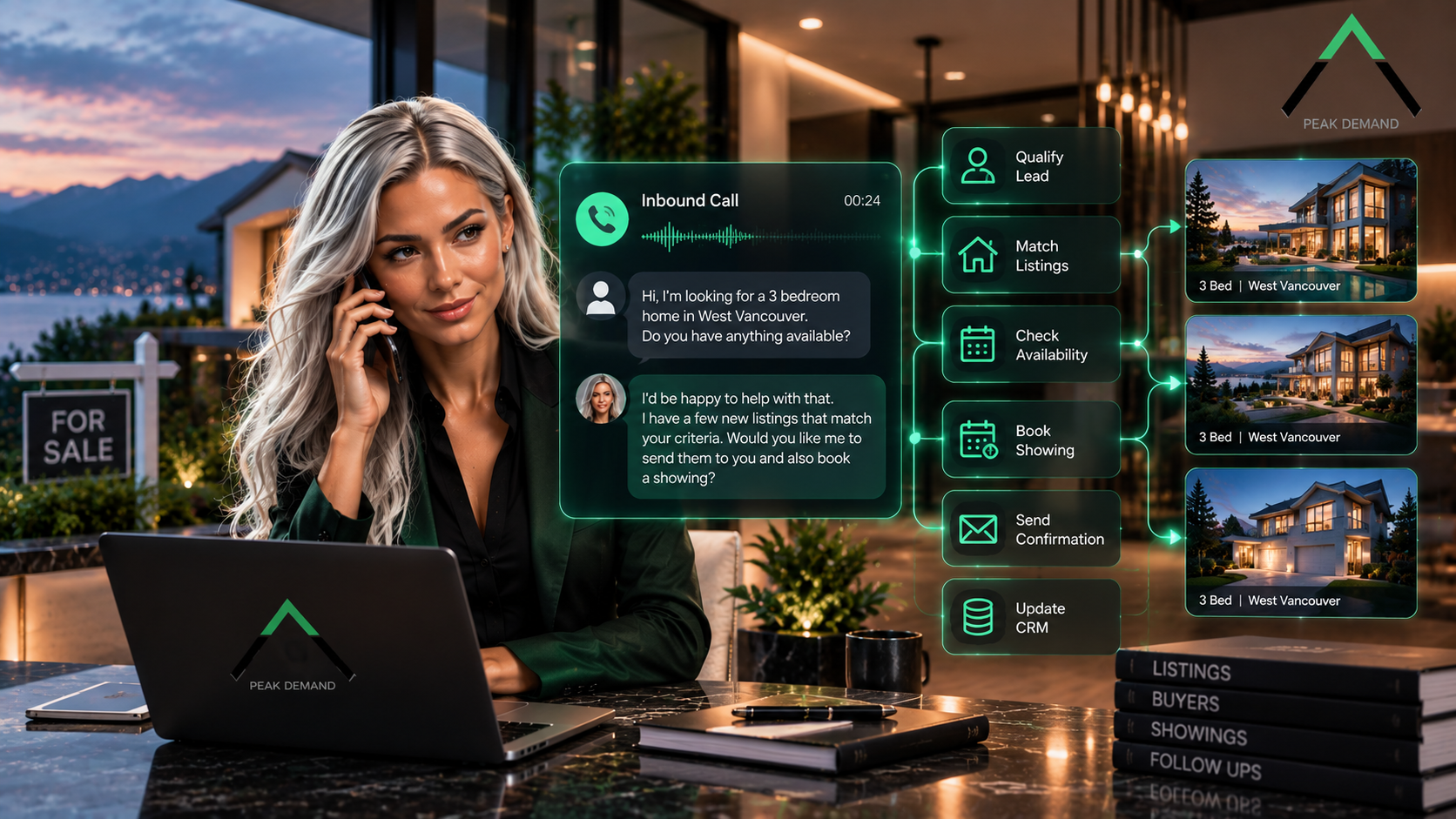
One real estate call can trigger an entire chain of approved actions.
The conversation is only the front end. A custom Voice AI workflow can understand the request, collect the right context, apply your business rules, interact with approved systems, and create the next operational step.

Buyer, seller, investor, and leasing calls do not need to behave the same way.
A custom build can adapt the questions, data capture, routing, booking, and follow-up logic to the actual type of opportunity instead of treating every lead as one generic contact record.
Buyer workflows
Capture property interest, geography, timing, requirements, approved readiness context, showing interest, and the next action your team wants created.
Seller workflows
Capture property details, timing, listing or valuation interest, consultation readiness, and the appropriate agent or team follow-up.
Investor & commercial workflows
Use distinct intake and routing logic for asset type, geography, investment criteria, commercial inquiries, portfolio context, or specialist teams.
Rental & leasing workflows
Handle availability questions, viewing requests, leasing intake, property-specific routing, and follow-up without mixing those calls into a sales script.
The workflow can ask only what is relevant, reuse context already provided, and skip questions that do not apply to that caller or property path.
The AI can follow the operational path behind the property request.
Real estate teams often need more than “take a message.” The Voice AI can be designed to understand the property context, determine the supported next step, and connect the call to showing, leasing, routing, CRM, or human-review workflows.

Showing requests
Identify the property, collect required context, apply showing rules, connect to the relevant scheduling process, and route exceptions where needed.
Consultations & valuation requests
Capture the reason for the appointment, property context, preferred timing, and the information required before booking or creating a structured handoff.
Leasing & viewing workflows
Support approved availability questions, viewing requests, leasing-team routing, follow-up tasks, and property-specific next steps.
Property-specific call logic
Use property, building, listing, region, office, or other approved context to determine which information, team, or action belongs to the call.
Confirmation & rescheduling
Supported workflows can confirm details, handle rescheduling rules, update the next step, and notify the responsible team when changes occur.
Exception paths
Unavailable times, unclear requests, restricted topics, sensitive issues, and requests outside the supported workflow can move to human review instead of being forced through automation.
The technical layer should support the workflow, not become the entire story.
Depending on the environment, the Voice AI can connect with CRM records, calendars, property systems, booking tools, databases, spreadsheets, notification paths, or custom software. Peak Demand can use middleware to coordinate those actions where a direct one-to-one integration is not enough.
CRM & lead records
Create or update contacts, attach summaries, tag intent, assign ownership, create tasks, and record approved call outcomes where access supports it.
Calendars & booking
Connect supported showing, consultation, callback, viewing, or appointment workflows to the right scheduling environment and business rules.
Property & listing systems
Use approved property or listing information to support factual questions, workflow routing, and property-specific actions where reliable access exists.
Databases & spreadsheets
Structured internal data can sometimes support availability, routing, ownership, reference information, or staff-ready outputs when a traditional CRM is not the only source.
Middleware orchestration
The middleware layer can apply rules between the conversation and downstream systems, coordinate actions, validate outputs, and create a more adaptable operating path.
Limited-access environments
When direct system actions are limited, the workflow can still produce structured summaries, alerts, approval tasks, or staff-ready handoffs instead of pretending full integration exists.
Custom Voice AI should know where automation stops.
The AI can organize calls, collect transaction-relevant context, create supported system actions, and move conversations forward. Professional judgment, negotiation, advice, approvals, and sensitive decisions can remain with authorized humans.
Real estate workflows should also avoid using protected personal characteristics as a basis for ranking, routing, or treating callers differently. The organization should define lawful qualification, routing, disclosure, retention, and review rules appropriate to the jurisdictions and services involved.
Transaction-relevant context
Focus on property, service need, timing, contact, scheduling, ownership, routing, and other information that supports the real estate workflow.
Approved actions only
Define what the AI can complete directly, what it can only prepare, and what should require human approval before anything changes downstream.
Human escalation
Keep clear handoff paths for ambiguity, complaints, negotiation, sensitive conversations, unavailable information, failed actions, and any situation where human judgment is the better next step.
A custom workflow should keep improving as real calls expose new patterns.
Peak Demand can support the Voice AI as an ongoing operating layer instead of leaving the organization with a static script. That can include call review, QA, routing changes, new branches, integration monitoring, approval logic, and continued optimization.
Call review & QA
Review real conversations to find repeated caller friction, missed context, unclear prompts, and opportunities to improve the workflow.
Workflow tuning
Change questions, branches, routing rules, confirmation steps, and escalation behaviour as the operating environment changes.
Integration monitoring
Watch for failed actions, permission changes, mapping issues, stale data, or system behaviour that affects the Voice AI workflow.
Controlled expansion
Add new call types, teams, properties, offices, languages, downstream actions, or outbound follow-up only when the underlying workflow is ready.
That is one of the core reasons to build a custom workflow rather than rely on a rigid receptionist product that cannot adapt to how the business evolves.
Questions real estate teams ask about custom Voice AI.
These answers focus on the practical questions brokerages, real estate teams, leasing groups, property organizations, inspectors, operators, and multi-office groups ask when evaluating a custom Voice AI workflow.
What is custom Voice AI for real estate?
Why would a real estate company need custom Voice AI instead of a generic AI receptionist?
Can Peak Demand build around our current real estate workflow?
Can buyer and seller calls follow different workflows?
Can leasing calls follow a different path from sales calls?
Can the AI handle property-specific inquiries?
Can the AI book property showings?
Can it book listing consultations or valuation appointments?
Can different offices have different rules?
Can different agents have different routing rules?
Can the AI route a caller to a human?
Can one phone call create actions in multiple systems?
Can custom Voice AI work with our existing CRM?
What if our real estate software has limited API access?
Can the AI use calendars and booking tools?
Can the workflow use spreadsheets or internal databases?
What is middleware in a Real Estate Voice AI workflow?
Does the AI have to make every decision automatically?
What happens when the AI reaches an exception?
Can the workflow change after launch?
Can Peak Demand manage the Voice AI after it goes live?
Can the custom Voice AI handle after-hours calls?
Can this work for brokerages, inspectors, leasing teams, and property groups?
Can the AI handle outbound follow-up too?
What should stay with humans instead of the AI?
How should fair housing and protected characteristics be handled?
How is this different from the AI Receptionist for Real Estate page?
How is this different from the Real Estate AI Lead Qualification page?
What should we bring to a discovery call?
Need a Voice AI agent that follows your real estate operation instead of forcing it into a generic script?
Peak Demand can design a custom Voice AI workflow around lead capture, showing coordination, leasing, property inquiries, booking, routing, CRM updates, human handoff, QA, and ongoing operational improvement.
Peak Demand can map the conversation, the downstream actions, the human review points, and the systems involved — then manage the workflow as it evolves.
The result is a Voice AI operating layer aligned to your process rather than a generic script your team has to work around.