

AI Listing Appointment Scheduler: Book Seller Consultations From Phone Leads
Peak Demand builds Real Estate Voice AI that can recognize seller intent, collect approved property and scheduling context, check configured consultation availability, and book or request the right listing appointment. Pricing, valuation, negotiation, legal, lending, representation, and other judgment-based decisions stay with authorized professionals.
A seller phone lead is more useful when the next step is already organized.
Seller calls often arrive with a clear goal: discuss a potential listing, ask about the selling process, request a valuation conversation, or connect with the right agent. If the call ends with only a loose message, staff still need to chase the seller, reconstruct the context, and find a workable appointment time.
An AI listing appointment scheduler can turn that first call into a structured booking path. The workflow can collect approved seller and property details, confirm what type of consultation is needed, apply the organization’s calendar and routing rules, and either book the appointment or create the correct staff follow-up when direct booking is not appropriate.
The Voice AI can organize the consultation and preserve seller context without estimating property value, recommending an asking price, negotiating terms, or making representation decisions.
Collect enough context to schedule the right conversation, not a generic appointment.
The exact fields should reflect the brokerage, team, market, consultation type, and connected systems. The goal is to give the next agent useful context without turning the call into an unnecessary interrogation.
Property context
Capture the property address or area, property type, ownership or occupancy context where appropriate, and the reason the seller is calling.
Selling timeline
Capture the seller’s stated timing, whether they are exploring or actively preparing to sell, and any approved timing details relevant to the appointment.
Consultation goal
Identify whether the caller is requesting a listing consultation, valuation conversation, seller callback, office meeting, property visit, or another supported appointment type.
Scheduling preferences
Confirm preferred days, times, meeting format, contact details, and any approved access or preparation details the organization wants before booking.
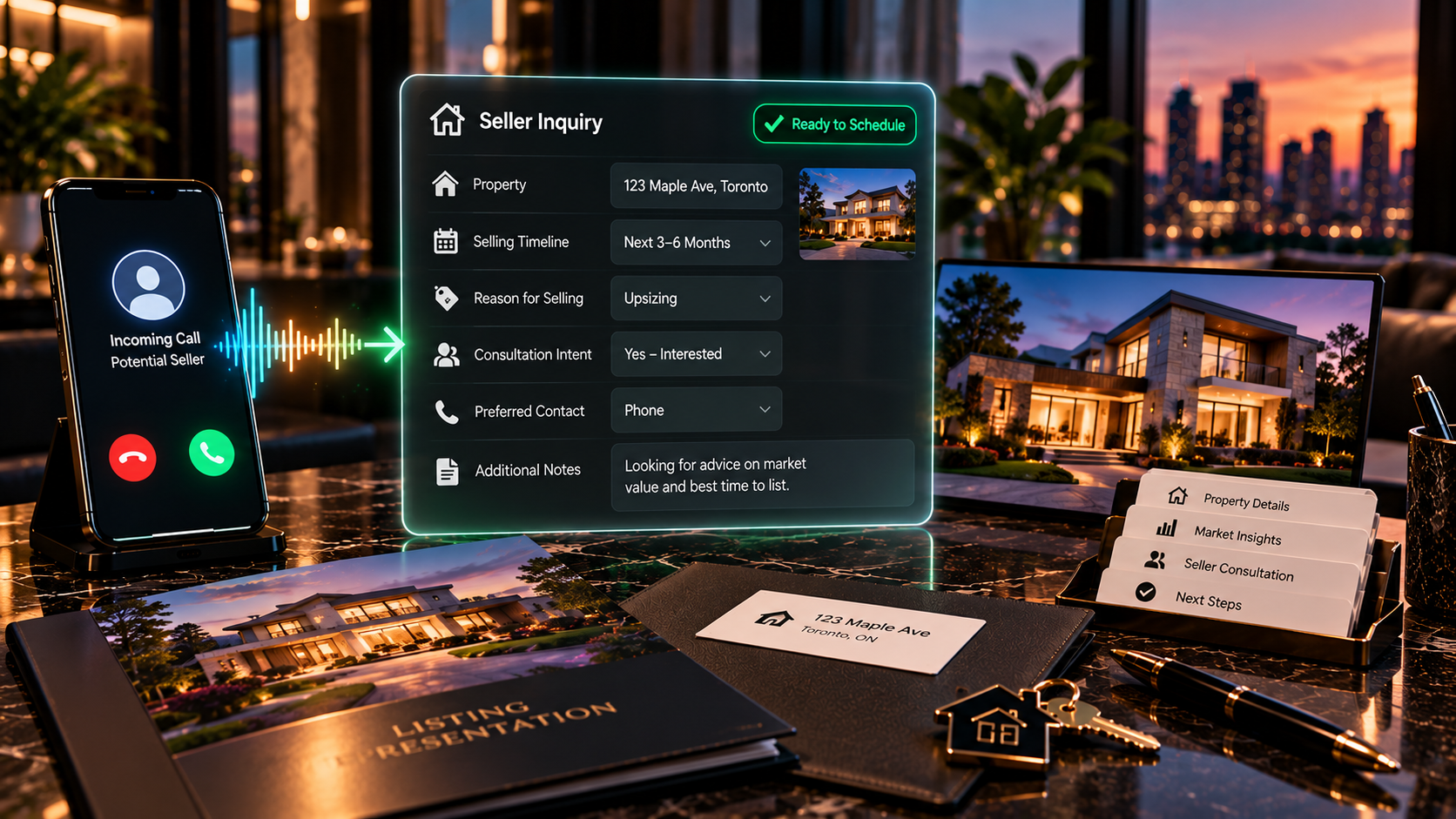
Move from seller intent to a confirmed consultation through client-defined rules.
The scheduling flow should follow the real operating model: which seller calls qualify for booking, which calendar applies, what information is required, how availability is offered, and what happens when the normal path does not fit.
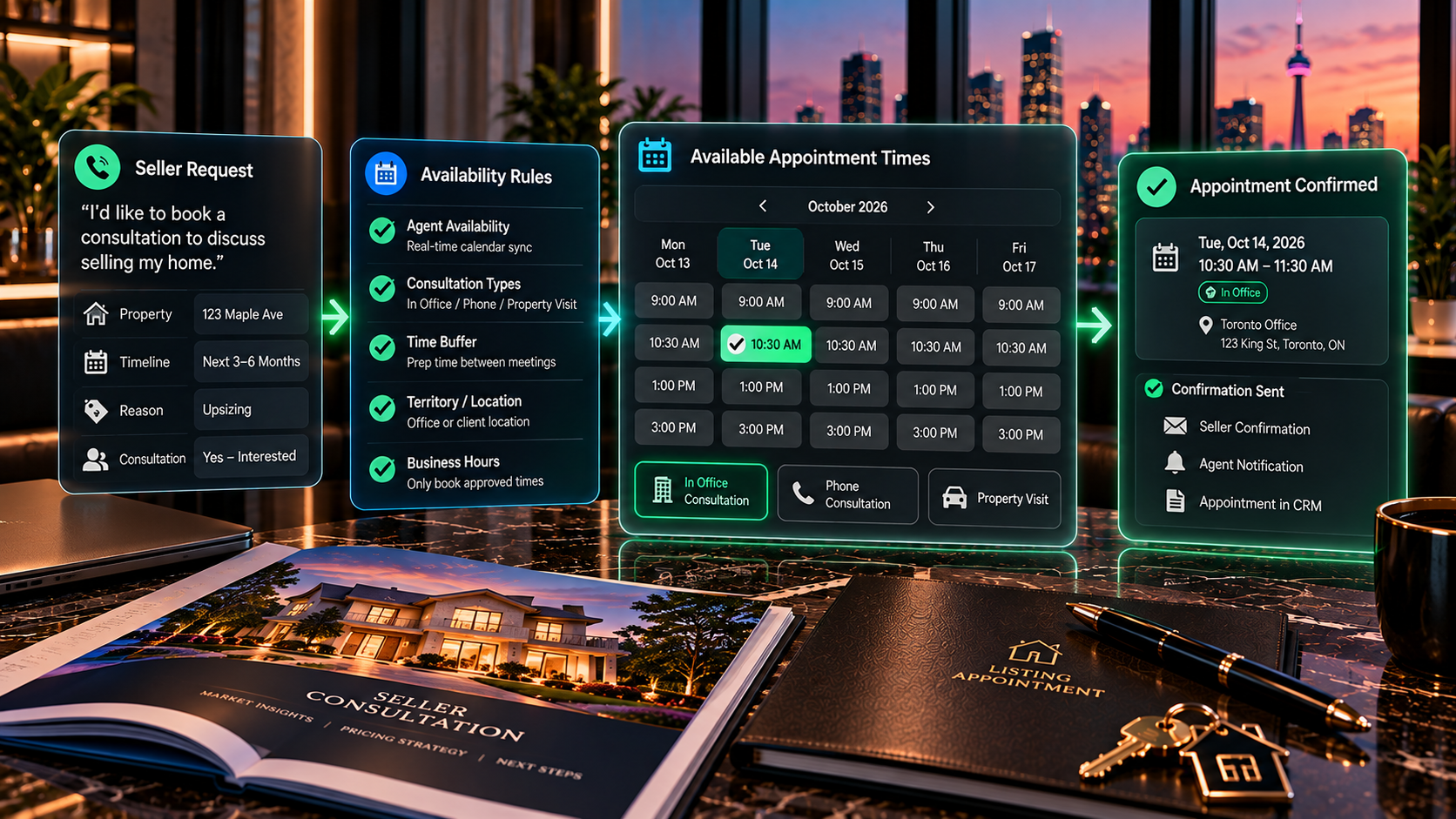
Availability should be filtered through the organization’s real scheduling rules.
Two open calendar slots are not always interchangeable. A custom workflow can account for the appointment type, office, territory, assigned agent, travel or preparation buffers, business hours, language coverage, lead ownership, and whether the seller needs a property visit, phone consultation, video meeting, or office appointment.
Correct calendar
Choose the calendar or booking resource using approved rules such as office, territory, existing ownership, service area, or agent availability.
Approved availability
Respect appointment duration, buffers, working hours, lead time, blackout periods, and other scheduling limits before a time is offered.
Clear confirmation
Read back the date, time, consultation format, location or meeting method, and required contact details before the booking is finalized.
No-slot fallback
If nothing appropriate is available, collect preferred times or create the approved callback, staff-review, or alternate-calendar path instead of forcing a bad booking.
Lead ownership
Preserve existing seller or agent ownership when the business rules require it, rather than creating a new appointment with the wrong team.
Appointment type
Different workflows can distinguish listing consultation, valuation conversation, office meeting, property visit, callback, or another supported seller appointment.
Schedule the consultation without pretending the scheduler is the listing agent.
The Voice AI can organize approved intake and scheduling tasks. It should not cross into pricing, valuation, negotiation, legal interpretation, lending, contract advice, representation decisions, or other professional judgment.
Voice AI can support
- Capture seller contact details, property context, stated timeline, consultation goal, and appointment preferences.
- Check approved calendars and offer times that fit configured scheduling rules.
- Confirm the appointment and create supported notifications, CRM updates, or staff-ready handoffs.
- Escalate unavailable slots, uncertain requests, sensitive questions, or failed system actions.
Humans remain responsible for
- Property valuation, pricing strategy, market interpretation, negotiation, and professional advice.
- Making exceptions or commercial decisions that require professional discretion.
- Legal, lending, contractual, representation, conflict, or other judgment-based decisions.
- Resolving unusual situations where the approved automation rules do not provide a safe answer.
A confirmed appointment should arrive with the seller context attached.
The consultation record can carry the seller’s contact details, property context, stated timing, appointment goal, confirmed date and time, source or campaign information, open questions, and any notes staff need before the conversation.
When the connected environment supports it, the booking can also trigger approved confirmations, CRM actions, ownership updates, notifications, or follow-up tasks. If a downstream action fails, the workflow should surface the exception rather than silently losing the appointment context.
Useful handoff context
Seller name and contact details, property or area, consultation type, confirmed time, preferred meeting format, lead source, assigned office or agent, unresolved questions, and the action completed or still awaiting review.

The scheduling experience depends on the systems behind the call.
Direct booking and downstream actions depend on calendar access, APIs, permissions, field mappings, CRM structure, notification tools, and the organization’s operating rules. Where direct access is limited, the workflow can still capture a complete appointment request and create a staff-ready handoff.
Calendars & booking tools
Read approved availability and create the correct appointment where the scheduling environment supports the required access.
CRM & lead records
Create or update approved seller records, attach call summaries, assign ownership, create tasks, or record the appointment outcome where supported.
Deterministic business rules
Apply the organization’s explicit rules for appointment type, office, territory, calendar, ownership, availability, and fallback behavior.
Notifications & confirmations
Trigger approved staff alerts or seller confirmations when the connected messaging environment and permissions support them.
Failure handling
If a calendar write, CRM update, or notification fails, create a visible exception path instead of assuming the downstream action succeeded.
Limited-access fallback
Capture the complete appointment request and preferred availability for staff confirmation when direct booking is not available.
Your consultation types, calendars, routing, confirmation rules, and exception paths can be different.
A brokerage, independent agent, real-estate team, new-development sales organization, or multi-office group may each define listing appointments differently. Peak Demand can configure the Voice AI around those client-specific rules instead of forcing every seller call through one prebuilt sequence.
That can include different intake questions, calendar ownership, property types, territories, appointment formats, durations, lead sources, routing rules, CRM actions, confirmation logic, after-hours behavior, multilingual paths, and points where a human must take over.
The caller should experience a simple conversation. The complexity belongs behind the scenes in the rules that decide what is asked, which calendar applies, what can be booked, and when the workflow moves to staff.
Questions real-estate organizations ask about seller consultation scheduling by Voice AI.
These answers focus on approved seller intake, calendar access, booking rules, confirmations, system actions, fallback paths, and the boundary between scheduling automation and professional judgment.
What is an AI listing appointment scheduler?
Can the AI book a listing consultation directly from a phone call?
What seller information can the AI collect before booking?
Can the AI provide a home valuation before the appointment?
Can it discuss listing price or recommend an asking price?
Can the AI check an agent’s calendar?
Can different agents have different listing-consultation calendars?
Can the AI offer more than one appointment time?
Can it schedule phone, video, office, or property consultations?
Can the AI reschedule or cancel listing appointments?
Can the AI send a booking confirmation?
Can it create or update a CRM record after booking?
Can the AI assign the seller lead to the right agent?
What happens if there is no appointment availability?
What happens if the seller asks a question the scheduler cannot answer?
Can the AI handle seller calls after hours?
Can it work for brokerages with multiple offices?
Can the AI work with seller leads from marketing campaigns?
Can the scheduler qualify the seller before booking?
Can the AI book an appointment without a live integration?
Can the AI handle multilingual seller calls?
What should remain with humans?
How is this different from AI Seller Inquiry Intake?
How is this different from AI Listing Appointment Booking?
What should we bring to a discovery call?
Turn seller phone leads into organized listing-consultation opportunities.
Peak Demand can map your seller call types, required intake, appointment formats, calendars, office or territory rules, confirmation process, CRM actions, and human-review paths into one controlled Voice AI scheduling workflow.
Seller call types, listing-consultation formats, appointment duration, buffers, calendars, agent or office ownership, territory rules, CRM fields, confirmation steps, after-hours behavior, escalation conditions, and the systems staff use after the appointment is booked.