

AI Receptionist for Property Management Companies: Tenant Calls, Leasing, Maintenance & Owner Inquiries
Peak Demand builds custom Voice AI receptionists around the way property management companies actually operate—separating resident and tenant calls from leasing prospects, maintenance requests, owner inquiries, vendor calls, after-hours issues, and staff-review workflows before moving each conversation into the correct next action.
Separate resident, prospect, owner, vendor, maintenance, application, office, and after-hours calls before routing the next step.
Apply the correct building, portfolio, leasing, maintenance, owner, office-hours, and escalation rules for the property involved.
Create approved records, requests, work orders, tours, tasks, alerts, callbacks, summaries, and system updates where supported.
Property management is not one call queue.
The same main number may receive a renter asking about a two-bedroom, a resident reporting a leak, an owner requesting an update, a vendor calling about a work order, an applicant asking about next steps, and a tenant trying to reach the property office.
A useful Voice AI receptionist has to identify the caller's relationship to the property, understand why they called, establish the correct building or portfolio context, collect the required details, and then apply the management company's approved workflow.
Peak Demand maps that logic around the actual property-management operation rather than forcing every call through one generic receptionist path.
- Identify resident or tenant, prospect, applicant, owner, vendor, service provider, or another approved caller type early.
- Confirm the correct property, building, unit, community, portfolio, or ownership context before presenting property-specific information.
- Branch into leasing, maintenance, resident service, owner, vendor, accounting, office, or after-hours workflows using approved rules.
- Create the correct next action instead of leaving staff with an unstructured voicemail.
Start with caller context, then enter the right operational workflow.
The front door can be shared. The workflow behind it should not be.
Identify caller type
Resident or tenant, rental prospect, applicant, owner, vendor, contractor, or another approved caller category.
Confirm property context
Identify the property, building, community, unit, portfolio, assigned manager, or owner relationship needed for routing.
Understand the request
Leasing question, tour, maintenance issue, resident service, owner update, vendor call, application question, office request, or another configured intent.
Create the next action
Answer approved information, create a request, book or request a tour, route a call, alert staff, create a callback, update a system, or escalate according to policy.
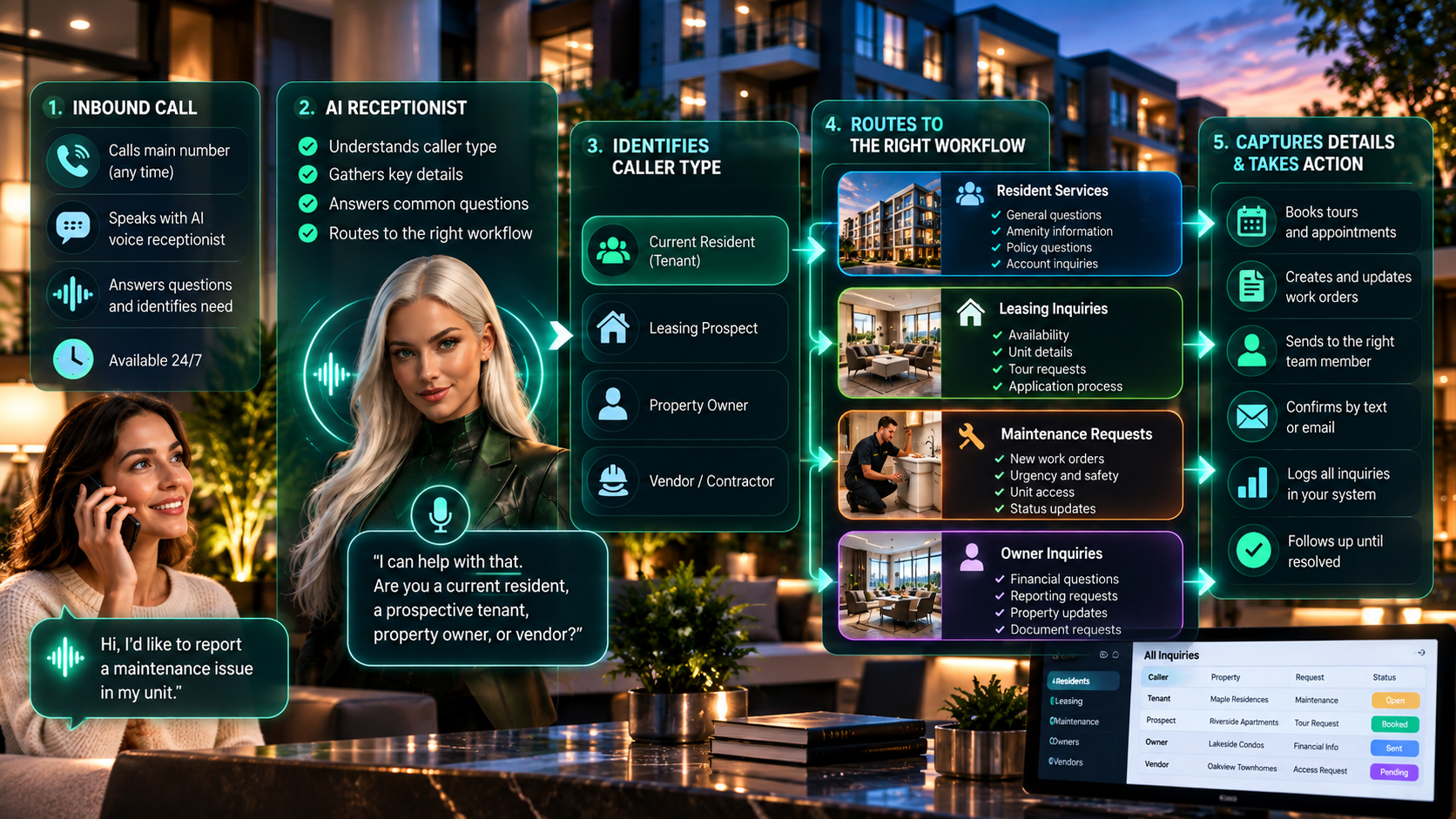
Give existing residents a path that does not restart as a leasing inquiry.
Resident calls can be recognized early and routed into service workflows for maintenance, office requests, access questions, account or payment-information routing, documents, building information, existing requests, and staff callbacks.
Resident identification
Confirm the property, building, unit, name, callback details, or other approved identifiers required before accessing or updating resident-specific information.
Maintenance
Capture issue details, access information, priority indicators, work-order context, and the approved maintenance or after-hours path.
Office & building questions
Answer approved questions about office hours, building access, amenities, parking, deliveries, policies, or other configured resident information.
Staff callback
Create a structured callback task with the property, unit, reason for calling, contact details, and conversation summary when staff review is needed.
Move rental inquiries from questions to verified availability, tours, and structured follow-up.
New prospects can enter a dedicated leasing workflow that uses the correct community information, availability source, tour calendar, prospect fields, and leasing-team ownership rules.
Leasing questions
Answer approved questions about units, rent ranges, amenities, pet and parking policies, move-in timing, applications, office hours, and tour options.
Availability & prospect intake
Use verified inventory where connected and capture property interest, unit needs, move-in timing, budget range, contact details, and other approved requirements.
Tour request or booking
Offer approved times, create a direct booking where supported, or collect preferred times for leasing-team confirmation.
Capture enough context for maintenance staff to act.
Maintenance calls can collect the property and unit, caller-described issue, affected area, timing, access information, pets or entry notes, callback details, existing request context, and configured priority indicators before routing the request.
Issue capture
Structure what the caller reports without forcing the Voice AI to make an unsupported technical diagnosis.
Priority rules
Apply property-defined operating rules to caller-stated facts and select routine, priority, after-hours, or escalation workflows.
Work orders & vendors
Create approved work-order actions or route to the internal maintenance team, assigned vendor, coordinator, or staff-review queue where supported.
After-hours escalation
Use separate on-call, emergency-vendor, callback, and next-business-day rules outside normal office hours.
Owner calls need different context, permissions, and routing from tenant or leasing calls.
Owner workflows can identify the property or portfolio involved, capture the reason for calling, provide authorized information from connected sources where appropriate, and route the request to the assigned property manager, owner-relations contact, accounting team, maintenance coordinator, or review queue.
Property updates
Capture or provide approved status information about leasing activity, open tasks, maintenance progress, documents, or another configured operational topic.
Accounting & statements
Provide approved connected information where permitted or route statement, payment, invoice, balance, and accounting questions to the correct team.
Approvals & decisions
Collect the context for repair approvals, vendor decisions, leasing questions, expenses, or other items that require owner or staff review.
Assigned-manager continuity
Use the property or ownership relationship to route the call or callback to the correct property manager rather than a generic shared queue.
Each caller type should leave staff with the right information.
Resident service, leasing, maintenance, and owner calls require different fields, different routing, and different next actions. A custom receptionist should preserve those distinctions.
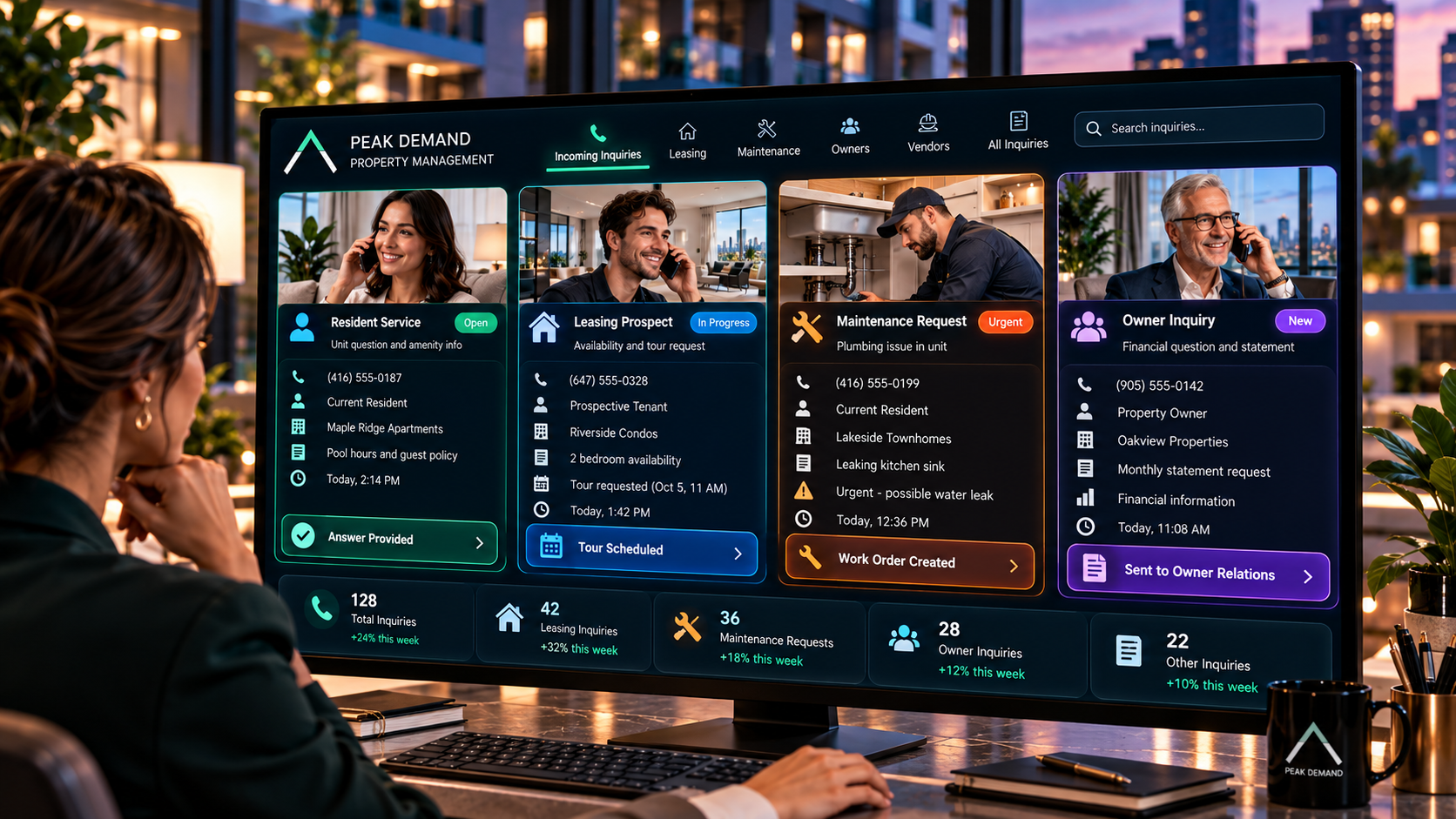
Property, caller type, request, ownership, and time of day can all affect the route.
A multi-property management company may have different leasing teams, maintenance coverage, property managers, owner contacts, vendors, office hours, and escalation rules across the portfolio.
Property route
Identify the correct building, community, region, portfolio, office, or assigned team before selecting the destination.
Caller-type route
Send residents, prospects, owners, vendors, applicants, and other caller groups into their approved operating paths.
Request route
Use leasing, maintenance, owner, vendor, office, document, accounting, or another configured request category to select the next step.
Fallback route
When the ideal team is unavailable or the request is unclear, create the approved backup transfer, callback, staff-review, or next-business-day action.
The same call can require a different response after the property office closes.
After-hours rules can keep routine leasing and resident questions moving while reserving on-call and escalation paths for the requests the property-management company has defined.
Leasing after hours
Answer approved property questions, capture prospect needs, request tours, and create the next-business-day leasing follow-up.
Resident after hours
Capture the reason for calling and separate routine office requests from maintenance, access, or configured escalation paths.
Maintenance on-call
Apply the property's after-hours priority rules and route approved maintenance categories into the correct on-call or vendor workflow.
Owner & vendor calls
Capture structured context and route urgent configured matters or create the appropriate next-business-day callback for the assigned team.
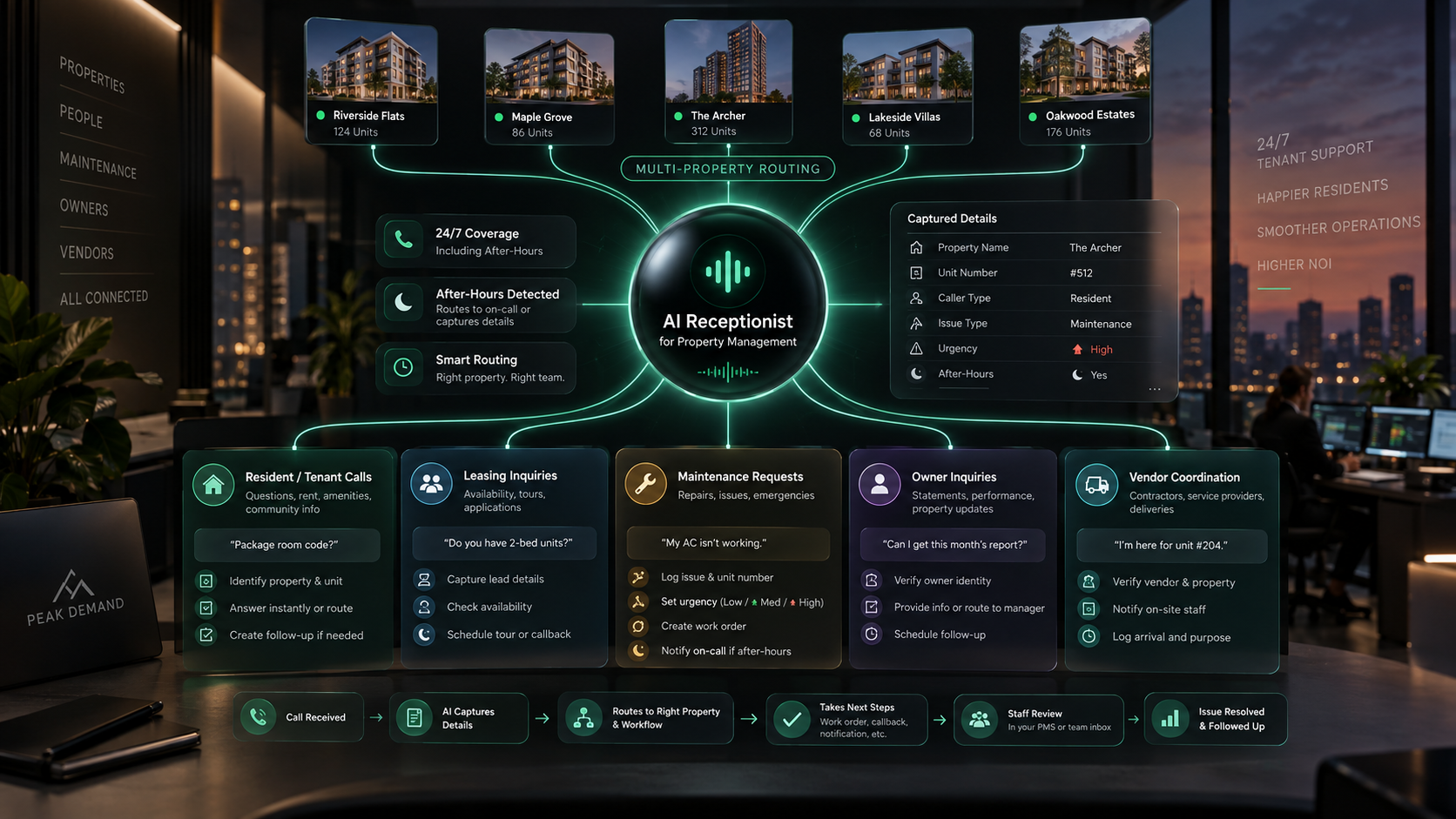
Connect the call to the property-management systems behind the team.
Peak Demand can design the integration and middleware layer that connects Voice AI to approved property-management platforms, CRMs, maintenance systems, availability sources, tour calendars, messaging tools, notifications, and custom software.
Resident & tenant records
Create approved service notes, callbacks, office requests, maintenance records, or other resident-facing actions where supported.
Leasing records
Create or update prospect records, tour requests, contact details, property interest, availability context, and approved follow-up tasks.
Maintenance actions
Create work orders, notifications, vendor routes, on-call alerts, callback tasks, and maintenance summaries where the connected system supports them.
Owner & staff actions
Create property-manager callbacks, accounting tasks, owner-review items, approvals, notifications, and structured conversation summaries.
Automate front-office work without removing the decisions that belong with authorized staff.
Property-management Voice AI can answer approved questions, collect objective information, create operational records, and apply documented routing rules. Housing eligibility, protected-characteristic decisions, technical diagnosis, emergency judgment, financial authorization, legal interpretation, and restricted account decisions remain with the appropriate human or authorized system process.
The AI should know what it may answer, what it may create, where each caller should route, and when the workflow must stop and hand control to authorized staff.
Go deeper into leasing, maintenance, showing, and lead workflows.
AI Rental Inquiry Answering
Handle leasing questions, verified availability, tour requests, prospect intake, and leasing-team follow-up.
AI Maintenance Request Intake
Capture maintenance issues, priority indicators, property and unit context, access details, routing, and after-hours escalation.
AI Showing Scheduler
Move property inquiries through showing requests, approved availability, confirmations, calendars, and agent notifications.
Real Estate AI Lead Qualification
Capture intent, timing, property needs, and next-step readiness from inbound real estate conversations.
Questions property management companies ask about custom Voice AI reception.
These answers cover resident and tenant calls, leasing, maintenance, property owners, vendors, after-hours routing, property systems, privacy, housing boundaries, and human control.
What is an AI receptionist for property management companies?
What types of property-management calls can the AI handle?
Can the AI separate tenant calls from new leasing inquiries?
Can the AI answer leasing questions?
Can the AI handle maintenance requests?
Can the AI handle owner inquiries?
Can different properties use different call rules?
Can calls be routed by property, unit, or caller type?
Can the AI handle after-hours property-management calls?
Can the AI create work orders?
Can the AI answer owner accounting or statement questions?
Can the AI handle vendor calls?
Can the receptionist connect to a property-management system or CRM?
Can the AI recognize existing applicants or residents?
Can the AI support multiple languages?
What happens if a system action or transfer fails?
How should fair-housing, privacy, and human-control boundaries be handled?
What should a property-management company bring to a discovery call?
Need one reception layer that understands the difference between a tenant, renter, owner, vendor, and maintenance call?
Peak Demand can map, build, connect, test, monitor, and improve a custom property-management Voice AI receptionist around your portfolio, caller types, leasing workflows, maintenance rules, owner relationships, after-hours process, routing logic, and connected systems.
Your team defines what each caller type can ask, what the AI may answer, what information must be captured, which system actions are allowed, where each property routes, and when staff must take control.
Peak Demand builds the Voice AI architecture around those rules and manages ongoing improvement as real calls reveal new patterns.