

AI Maintenance Request Intake for Property Management: Capture Issues, Priority & Routing Details
Peak Demand builds custom Voice AI maintenance-intake workflows that capture what the caller is reporting, identify the property and unit, collect access and callback details, apply your approved priority rules, and route the request into the correct maintenance, vendor, after-hours, or staff-review path.
Collect the property, unit, issue category, symptoms, timing, access details, callback information, and other required maintenance fields.
Apply your configured priority rules to caller-stated facts and send each request into the correct operational path.
Create approved system actions, alerts, vendor routes, on-call handoffs, callbacks, or staff-review tasks where supported.
A maintenance call needs more than a message saying “something is broken.”
Property-management teams need enough context to know where the issue is, what the caller is experiencing, how quickly the request should be reviewed, who owns the next step, and whether the request should become a work order, vendor dispatch, callback, live escalation, or staff-review task.
Peak Demand maps the maintenance-intake workflow around the property manager's actual portfolio, issue categories, priority rules, on-call structure, vendor assignments, work-order platform, access requirements, and escalation process.
The goal is not to force the AI to diagnose the property problem. The goal is to capture the caller's description accurately, structure the information, apply the approved operating rules, and move the request to the right next step.
- Capture property, building, unit, caller, callback, issue, timing, access, pet, and contact-preference details where required.
- Separate routine maintenance, priority review, after-hours, vendor, emergency escalation, and staff-review paths.
- Use property-specific rules so different buildings, portfolios, owners, regions, or management teams can operate differently.
- Connect the call to work orders, notifications, vendor routing, callbacks, and documented fallback actions where supported.
Turn an unstructured maintenance call into a structured request.
The workflow can collect the details maintenance staff actually need before deciding which work-order, vendor, on-call, callback, or staff-review path should follow.
Identify the property and unit
Confirm the address, property, building, unit, suite, or portfolio context required by the management team.
Capture the maintenance issue
Record the caller's description, affected area, issue category, symptoms, when it started, and other approved troubleshooting questions.
Collect access and callback details
Capture phone number, preferred contact method, entry instructions, access windows, pet information, and other property-specific notes.
Apply priority and routing rules
Use caller-stated facts and the property's configured operating rules to select the approved work-order, vendor, on-call, callback, or review path.
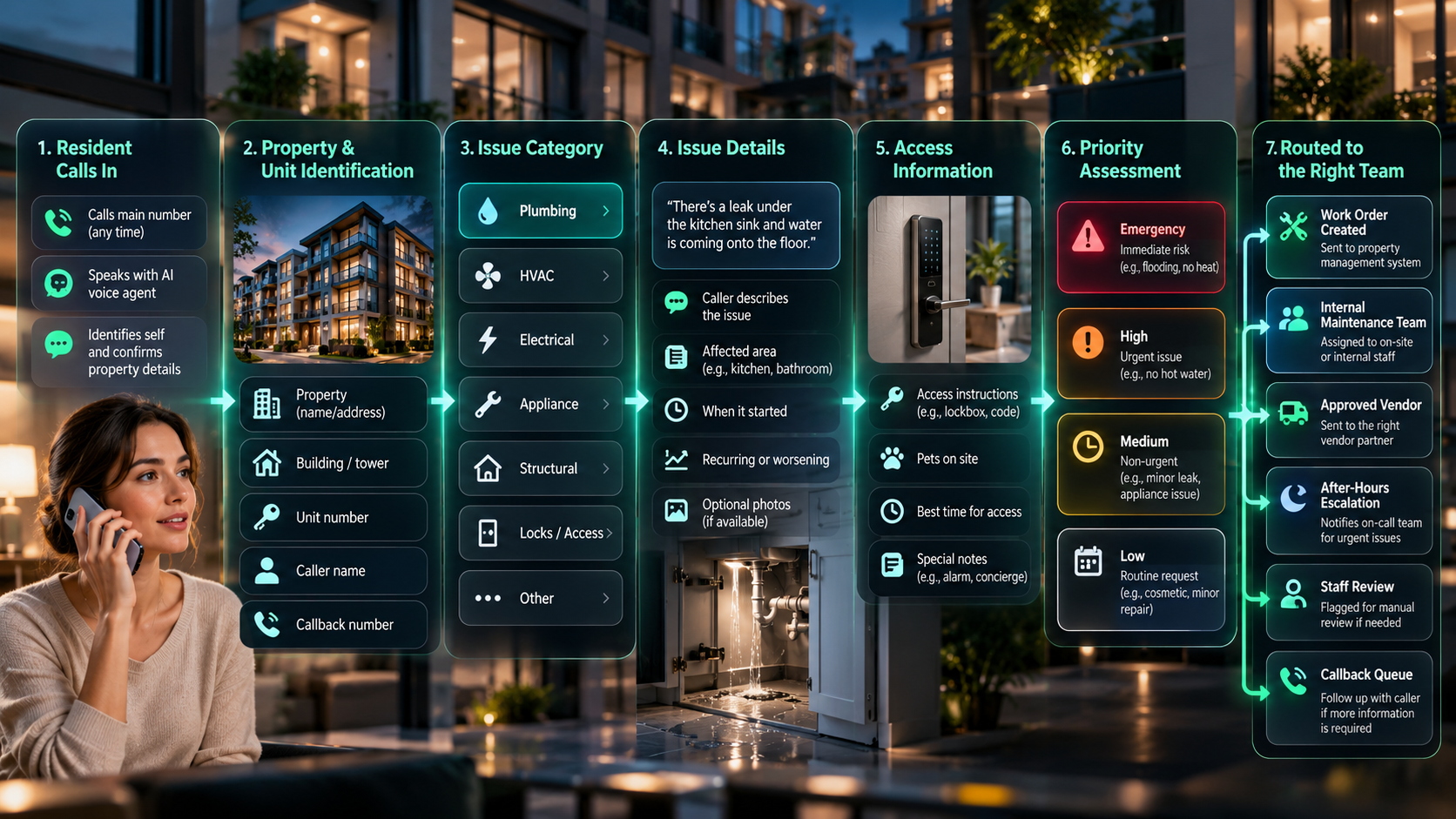
Collect the details your maintenance team needs without forcing a diagnosis.
The caller describes what they can observe. The Voice AI organizes that information into the fields your property-management workflow needs.
Property & unit
Address, building, unit, suite, portfolio, property manager, and other location identifiers required for routing.
Issue category
Plumbing, HVAC, electrical, appliance, access, pest, common area, water, elevator, landscaping, or another approved category.
Caller-described symptoms
What the caller sees, hears, smells, feels, or notices—captured as reported rather than converted into an unsupported technical diagnosis.
Timing
When the issue started, whether it is ongoing, intermittent, worsening, recurring, or connected to an earlier maintenance request.
Access details
Resident availability, preferred entry window, concierge or lockbox information, pets, and approved property-specific access notes.
Contact details
Caller name, callback number, email where needed, preferred contact method, and who should receive follow-up.
Prior work
Capture whether the caller reports a previous repair, repeated issue, earlier vendor visit, or existing request reference.
Attachments or follow-up
Where supported, create the next step for photos, documents, callback questions, inspection notes, or staff review.
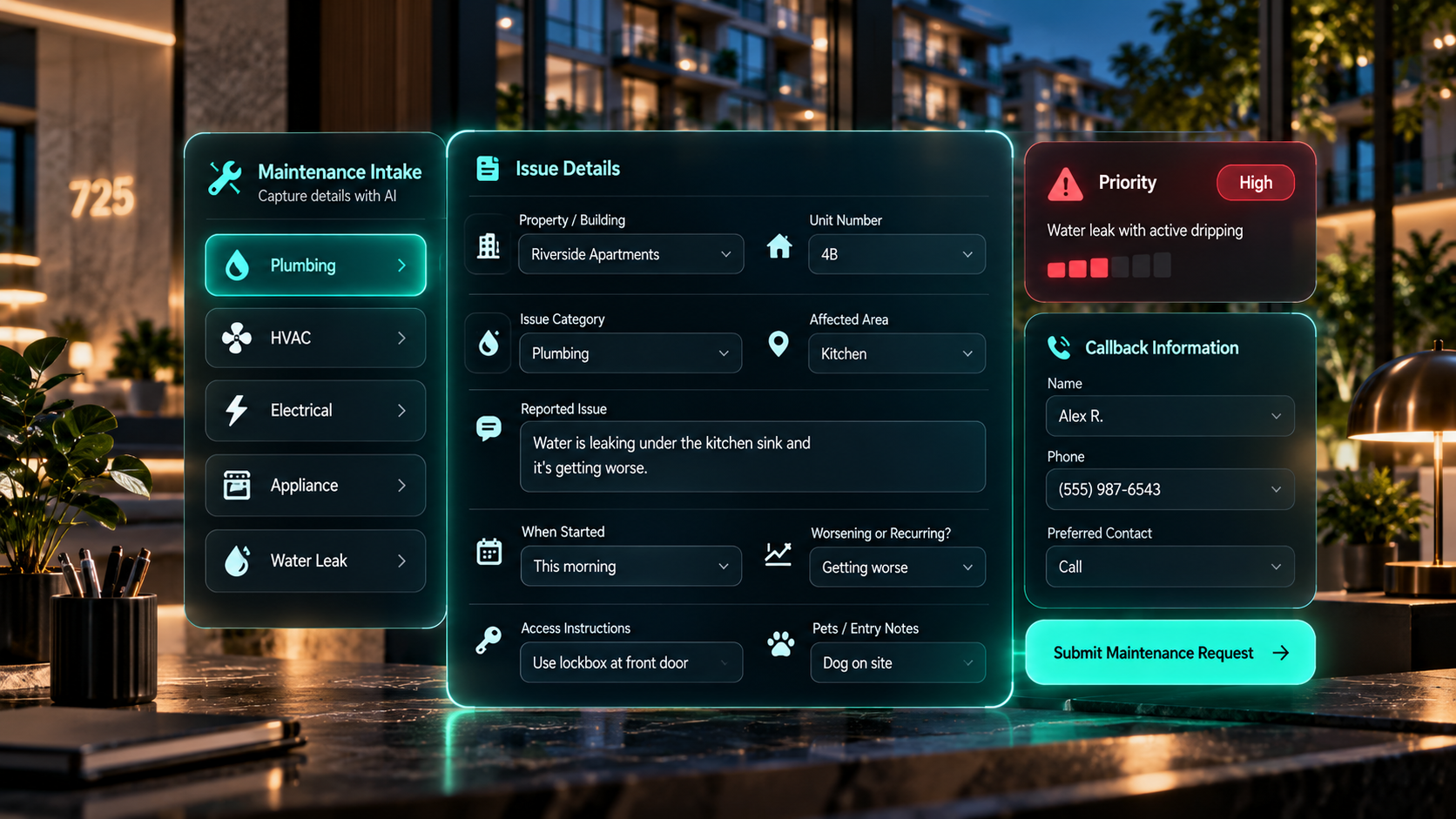
Priority can be rule-based without asking the AI to make unsupported judgments.
Property managers can define the caller-stated conditions that should trigger routine handling, accelerated review, after-hours escalation, or an emergency path.
Standard maintenance
Requests that match the property's normal maintenance criteria can enter the standard work-order or maintenance queue.
Accelerated review
Configured facts such as active water spread, loss of a critical service, access concerns, or repeated failure can trigger a higher-priority review path when the property manager defines those rules.
Emergency or on-call path
When the caller reports a condition that matches the property's emergency or after-hours trigger list, the workflow can route into the approved on-call, vendor, live-transfer, or emergency-notification path.
The Voice AI can recognize configured caller-stated conditions and trigger the corresponding workflow, while technical diagnosis and unsupported safety judgments remain outside the automated intake role.
The same maintenance issue can route differently depending on the property.
Portfolio structure, property ownership, issue category, service hours, geography, vendor agreements, building systems, and on-call coverage can all affect who should receive the request.
Property-specific route
Direct the request using the address, building, unit, portfolio, property manager, maintenance team, or regional ownership rules.
Issue-category route
Send plumbing, HVAC, electrical, appliance, pest, lock, elevator, or other categories to their approved internal team or vendor path.
Vendor route
Use approved vendor coverage, geography, contract, issue type, service hours, or property assignment to select the next destination.
Staff-review route
When the issue does not map cleanly, create a structured review task rather than guessing at the correct trade or service provider.
After-hours calls can use a different operating model from daytime maintenance.
The same property can have separate business-hours and after-hours rules, with different on-call staff, vendors, notification thresholds, callback expectations, and escalation destinations.
On-call maintenance
Route approved after-hours maintenance categories to the current on-call team, live transfer destination, or priority callback workflow.
Emergency vendor path
Selected caller-stated conditions can trigger the approved emergency vendor or contractor route for the correct property and service category.
Hold for business hours
Routine after-hours requests can be documented completely and placed into the next-business-day queue rather than waking an on-call team unnecessarily.
Fallback when contact fails
If the first on-call transfer or notification fails, move through the property's documented backup contacts, callback path, staff alert, or manual-review queue.
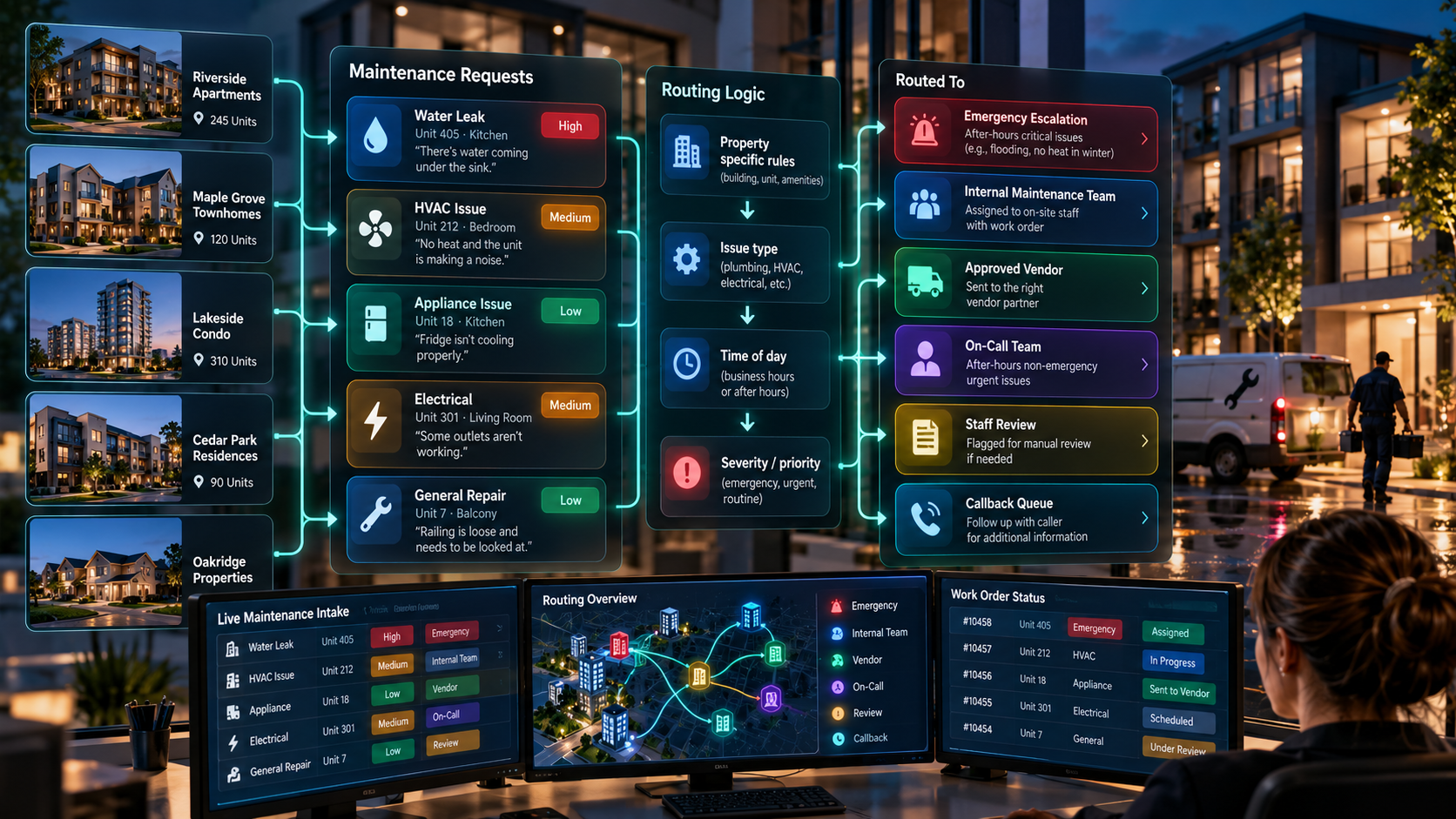
The maintenance call should create the next operational action.
Peak Demand can design the integration and middleware layer that connects Voice AI to approved property-management systems, maintenance platforms, work-order tools, vendor workflows, notifications, calendars, and custom software.
Work-order creation
Create an approved work order with the structured issue, property, unit, caller, priority, access, and routing information where the connected platform supports it.
Existing-request updates
Where supported, connect the new call to an existing maintenance request or create the staff task needed to review a recurring issue.
Staff and vendor alerts
Send structured notifications, priority alerts, callback tasks, work-order references, or escalation messages to the appropriate team.
Fallback on system failure
If the connected action fails, create the approved manual follow-up rather than telling the caller the work order or vendor action completed successfully.
The AI captures and routes maintenance information; your team retains technical and safety judgment.
Voice AI can structure the request and apply documented operating rules, while maintenance staff, property managers, qualified vendors, and emergency services retain the decisions that require technical, legal, safety, or professional judgment.
The maintenance workflow should make it easier for the qualified team to act—not replace the technical judgment required to diagnose, authorize, or perform the repair.
Connect maintenance intake to the broader real estate Voice AI architecture.
Property-management operations can combine maintenance intake with lead handling, showing scheduling, routing, system updates, and other custom real estate workflows.
Real Estate AI Lead Qualification
Capture intent, timing, property needs, and next-step readiness from inbound real estate conversations.
AI Showing Scheduler for Real Estate
Move property inquiries through showing requests, availability, confirmations, calendars, and agent notifications.
Voice AI API Integrations
Connect the Voice AI layer to approved property-management systems, work-order tools, CRMs, calendars, notifications, and custom software.
Questions property managers ask about Voice AI maintenance intake.
These answers focus on maintenance detail capture, priority rules, work orders, property and vendor routing, after-hours escalation, integrations, and the human-control boundaries that should be defined before launch.
What is AI maintenance request intake for property management?
What maintenance details can the AI collect?
Can the AI determine how urgent a maintenance issue is?
Can emergency maintenance calls be escalated?
Can different properties use different maintenance rules?
Can requests be routed by maintenance category?
Can the workflow route requests by property or building?
Can the AI create a work order?
Can the AI handle after-hours maintenance calls?
Can the AI collect access instructions?
Can maintenance intake support multiple languages?
What happens if the caller is unsure what is wrong?
Can the AI route the request to a preferred vendor?
Can the workflow send notifications to property staff?
Can the AI handle status-check calls about existing maintenance requests?
What happens if the system or work-order action fails?
Can the maintenance workflow change over time?
What should a property manager bring to a maintenance-intake discovery call?
Need maintenance calls to arrive with the details your team actually needs?
Peak Demand can map, build, connect, test, monitor, and improve a custom property-management maintenance intake workflow around your buildings, issue categories, priority rules, access requirements, vendors, on-call process, work-order system, and staff-review paths.
Your team defines what must be captured, which requests receive priority, which property or vendor owns the next step, when after-hours escalation applies, and what should happen when the ideal route is unavailable.
Peak Demand builds the Voice AI workflow around those rules and manages ongoing improvement as real maintenance calls reveal new patterns.